
The Official Music Technology Dictionary
The definitive examiner-aligned revision glossary covering Recording, Synthesis, Sampling, Dynamics, EQ, and Effects with high-yield signal flow diagrams and studio hardware illustrations.
General Audio & Acoustic Fundamentals
Core definitions of amplitude, frequency, decibels, transducers, and signal characteristics.
41 Terms
Key Diagrams & Hardware Guides
Examiner-verified signal flow, schematics, and equipment photos for this module.
🔍 Enlarge
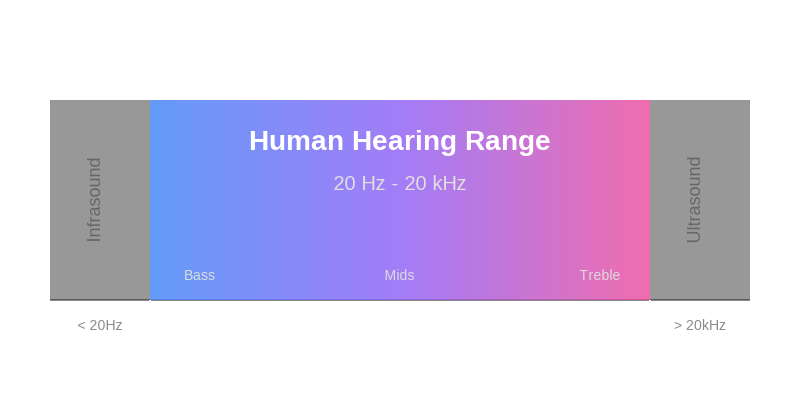
Human Hearing Spectrum
20Hz – 20kHz frequency spectrum and octave distribution audible to human hearing.
🔍 Enlarge
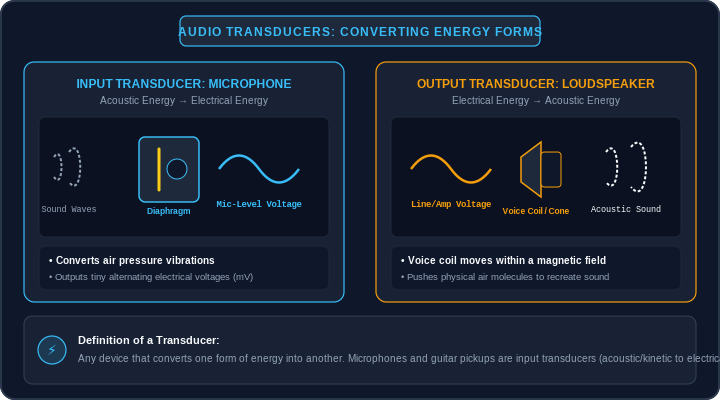
Transducer Principle
Conversion of mechanical air pressure fluctuations into electrical voltage across diaphragms.
🔍 Enlarge
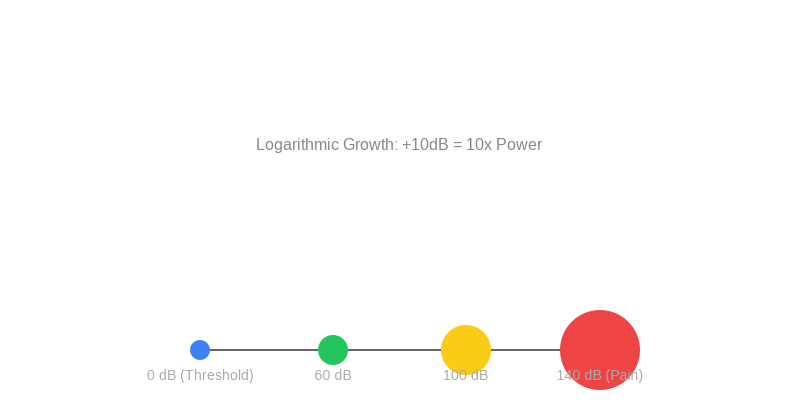
Decibel & Dynamic Range Scale
Logarithmic dB scale from 0 dB SPL (threshold of hearing) to 130 dB SPL (threshold of pain).
| Term | Examiner Definition & Technical Explanation | Study Guide |
|---|---|---|
|
Amplify
General Music Tech Terms |
Increases the amplitude or level of an electrical audio signal. An amplifier is a piece of hardware that boosts the signal |
Component 4 Guide → |
|
Amplitude
General Music Tech Terms |
Another term for loudness or level, measured in decibels (dBs) |
Component 4 Guide → |
|
Analogue
General Music Tech Terms |
An analogue signal resembles a sound by replicating the amplitude of the sound’s wave. This can be recorded electrically or magnetically. |
Component 4 Guide → |
|
Attack
General Music Tech Terms |
The time it takes for sound to reach its full velocity after being triggered. |
Component 4 Guide → |
|
Attenuate
General Music Tech Terms |
Posh word for ‘cut’. |
Component 4 Guide → |
|
Compressor
General Music Tech Terms |
Reduces the dynamic range. (makes loud sounds quieter and quiet sounds louder) |
Component 4 Guide → |
|
DAW
General Music Tech Terms |
Digital Audio Workstation |
DAW & Mixers Guide → |
|
dB (decibels)
General Music Tech Terms |
A unit of level or amplitude |
Component 4 Guide → |
|
Decay
General Music Tech Terms |
The time it takes for sound to fall from its peak velocity to its sustain level. |
Component 4 Guide → |
|
Delay
General Music Tech Terms |
It records the input signal and then plays the sound back at a later time (delay) |
Delay Guide → |
|
Digital
General Music Tech Terms |
A process of representing a waveform in a binary code (0’s & 1’s). |
Component 4 Guide → |
|
Dynamic Processing
General Music Tech Terms |
An effect that deals with level, amplitude or volume |
Component 4 Guide → |
|
Envelope (ADSR)
General Music Tech Terms |
A way of automating the shape of a sound, most commonly through the amplitude and ‘ADSR’ controls |
Synthesizer Guide → |
|
Equalisation (EQ)
General Music Tech Terms |
An insert effect that can alter the timbre (tone) of the input sound using filters. |
Component 4 Guide → |
|
Filter
General Music Tech Terms |
An effect that boosts or cuts frequencies within a spectrum in order to shape the timbre (tone) of a sound. |
Component 4 Guide → |
|
Insert
General Music Tech Terms |
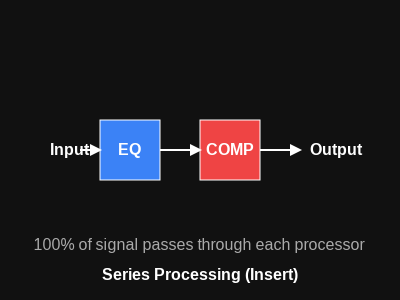
An effect that is added in ‘series’ within a signal chain. i.e. one effect after another (NOT Parallel!) |
Component 4 Guide → |
|
Frequency
General Music Tech Terms |
Scientific measurement for different pitches. Measured in hertz. The limits of human hearing, known as the ‘frequency spectrum’ is 20Hz to 20Khz. |
Component 4 Guide → |
|
Hardware
General Music Tech Terms |
A piece of physical equipment such as a microphone or ‘outboard’ compressor |
Component 4 Guide → |
|
Interface
General Music Tech Terms |
Converts analogue signals to digital code that can be recorded and stored on a computer. |
Component 4 Guide → |
|
MIDI
General Music Tech Terms |
Music Instrument Digital Interface. The standard protocol that allow synths and drum machines to communicate with a sequencer (DAW) |
Sampling & MIDI Guide → |
|
Mixer
General Music Tech Terms |
A device that is used to blend the levels of incoming sounds together and output them as a combined audio signal |
Audio Mixers Guide → |
|
Modulation
General Music Tech Terms |
Change in a specific parameter over time. For example, pitch modulation is called vibrato |
Component 4 Guide → |
|
Monitor
General Music Tech Terms |
A process of listening to a sound through speakers or headphones |
Component 4 Guide → |
|
Mono
General Music Tech Terms |
A single audio tracks that has no left or right stereo information |
Component 4 Guide → |
|
Microphone
General Music Tech Terms |
A device for recording sound that converts variations in air pressure level into an electrical signal. |
Recording & Mixing Guide → |
|
Multi-track Recording
General Music Tech Terms |
The ability to record more than one sound source at a time onto discrete tracks for mixing at a later date. |
Component 4 Guide → |
|
Noise Gate
General Music Tech Terms |
A dynamic effect that will block out unwanted sounds that occur under a specified level (threshold). I.e. to get rid of guitar hum when not playing. |
Component 4 Guide → |
|
Production Technique
General Music Tech Terms |
A technique that is used to improve a recording of performance. |
Component 4 Guide → |
|
Release
General Music Tech Terms |
Time it takes for the sound to reach zero after the note is released. |
Component 4 Guide → |
|
Reverb
General Music Tech Terms |
An effect that replicates that ambience of a given space, such as a church or bathroom. |
Reverb Guide → |
|
Sample
General Music Tech Terms |
An audio clip that can be manipulated in a similar way to a synth |
Sampling & MIDI Guide → |
|
Samplers
General Music Tech Terms |
A type of digital recording device that allows audio to be controlled via MIDI, such as the Akai S1000 |
Sampling & MIDI Guide → |
|
Software
General Music Tech Terms |
A digital version of a piece of hardware (software compression) |
Component 4 Guide → |
|
Signal processing
General Music Tech Terms |
What is done to audio in order to change its characteristics |
Component 4 Guide → |
|
Stereo
General Music Tech Terms |
An audio track that has both left and right channels played at the same time. |
Component 4 Guide → |
|
Sustain
General Music Tech Terms |
The volume/amplitude of the note when it is held. |
Component 4 Guide → |
|
Synthesis
General Music Tech Terms |
A process of creating sounds using an combination of oscillators which create waveforms (such as sine & square) and tone shaping processes e.g. filter & ADSR envelope |
Component 4 Guide → |
|
Pan
General Music Tech Terms |
Short for ‘panorama’. Sending sound to left and right channels (speakers) independently. |
Component 4 Guide → |
|
Recording Studio
General Music Tech Terms |
A place where you record sound, usually comprised of a live room (for your musicians) and control room (for your recording engineer and producers) |
Component 4 Guide → |
|
Quantise
General Music Tech Terms |
A process that snaps MIDI note to the designated rhythmic subdivision. E.g. 1/8 Quantise will snap the notes to the nearest 8th note or quaver. |
Sampling & MIDI Guide → |
|
Timbre/tone
General Music Tech Terms |
The type or characteristic of a sound. For example the difference in character of a Saxophone and violin. |
Component 4 Guide → |
Recording, Studio Hardware & Signal Flow
DAW transport, automation modes, patch bays, and studio hardware signal flow.
47 Terms
Key Diagrams & Hardware Guides
Examiner-verified signal flow, schematics, and equipment photos for this module.
🔍 Enlarge
Serial Insert Signal Flow
100% of channel signal routes sequentially through hardware/plugin processors (e.g. EQ, compressor).
🔍 Enlarge
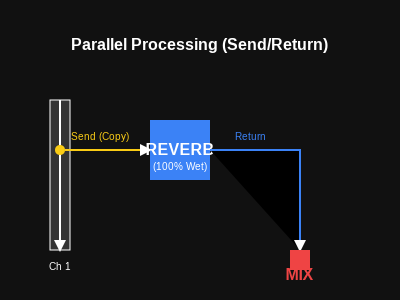
Parallel Aux Send / Return
A tapped copy of multiple channels feeds a shared auxiliary bus processor (e.g. reverb, delay).
🔍 Enlarge
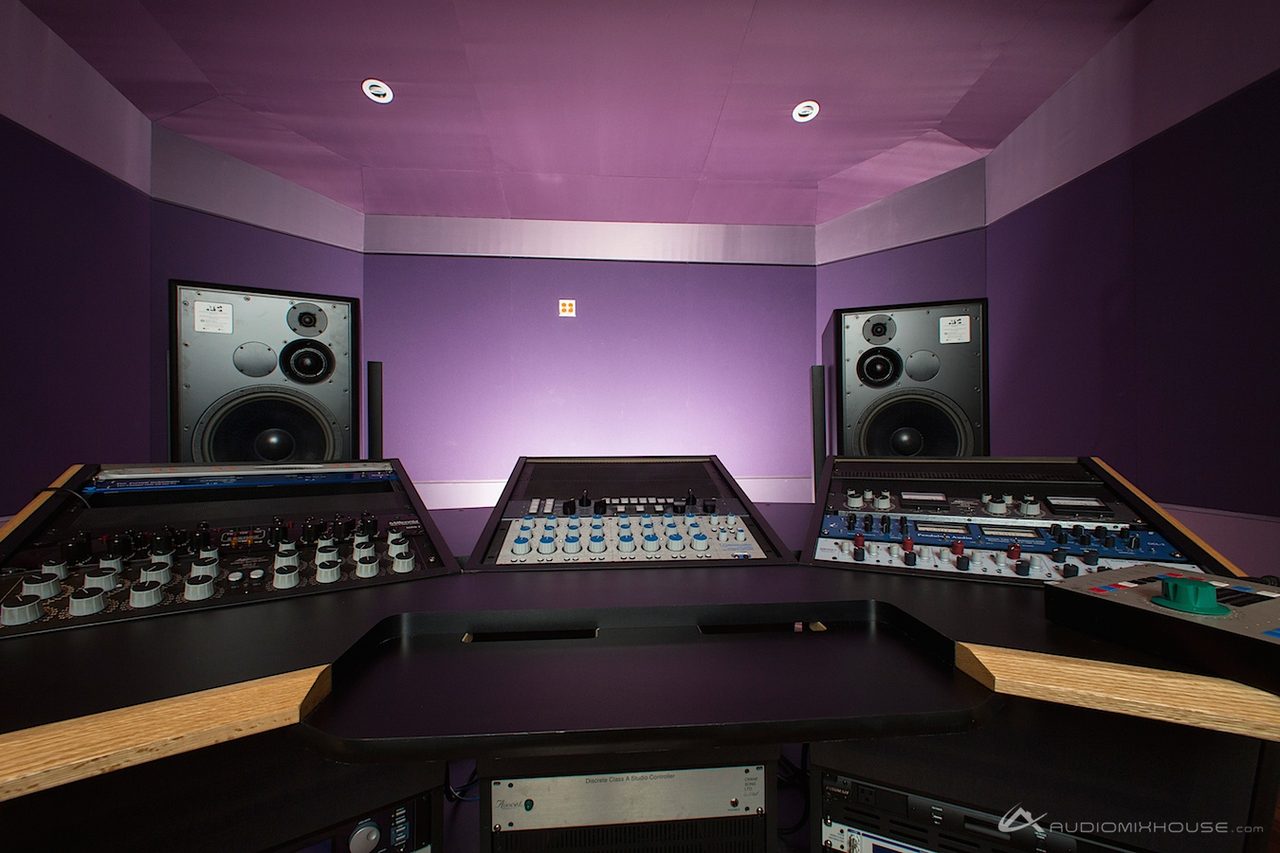
Professional Studio Control Room
Acoustically isolated control room with mixing console, nearfield monitors, and outboard rack hardware.
🔍 Enlarge
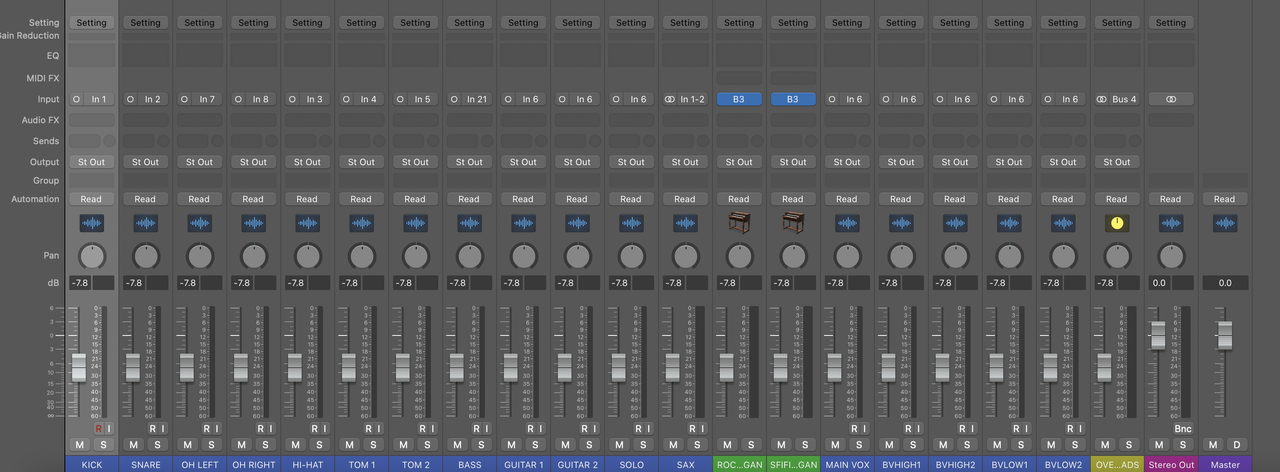
Digital Audio Workstation (DAW) Mixer
Software mixing environment featuring channel strips, inserts, sends, faders, and stereo bus routing.
| Term | Examiner Definition & Technical Explanation | Study Guide |
|---|---|---|
|
Auto Punch in
DAW Functions |
When you set a DAW to record for a short window in order to correct mistakes recording audio. |
DAW & Mixers Guide → |
|
Bounce
DAW Functions |
When multiple audio ‘stems’ are combined into one. |
DAW & Mixers Guide → |
|
Overdub
DAW Functions |
Recording audio ‘over the top’ of pre-existing audio. Also known as multi-track recording. |
DAW & Mixers Guide → |
|
Patch
DAW Functions |
A jargon-y word for a MIDI synth pre-set. Comes from when physical cables had to be ‘patched’ |
Recording & Mixing Guide → |
|
Playhead
DAW Functions |
The line where the music is playing in Logic. |
DAW & Mixers Guide → |
|
Region
DAW Functions |
The green boxes that contain the notes. |
DAW & Mixers Guide → |
|
Transport Bar
DAW Functions |
Incorporates play, record and stop. |
DAW & Mixers Guide → |
|
Velocity
DAW Functions |
How hard the notes are played. Affects timbres as well as volume. |
Recording & Mixing Guide → |
|
Bars, beats, divisions and ticks
DAW Functions |
Bar = 4 beats. Beat = 1/4 note. Division = 1/16th note. Tick = 1/240th of a division (1/3840th of a beat!!). |
Recording & Mixing Guide → |
|
Read
Automation |
Logic plays back automation. |
DAW & Mixers Guide → |
|
Latch
Automation |
Records values that you change using playback and leaves them at that value (e.g. Pan -63) |
DAW & Mixers Guide → |
|
Touch
Automation |
Logic will record automation but as soon as you let go of the controls will jump back to the original position. |
DAW & Mixers Guide → |
|
Write
Automation |
Overrides everything. NEVER USE. |
DAW & Mixers Guide → |
|
MIDI Automation
Automation |
Records automation to MIDI file not just Logic. This will save the MIDI automation if the file is exported as .mid. These can then be opened in other DAWs |
DAW & Mixers Guide → |
|
Microphone
Studio Hardware |
Turns variations in air pressure into an electrical waveform. A form of transducer. A transducer converts one form of energy into another form of energy. |
Recording & Mixing Guide → |
|
Audio interface
Studio Hardware |
Converts Input audio to a digital code via a Analogue to Digital converter. The digital code is what is recorded by a DAW. |
Recording & Mixing Guide → |
|
Microphone pre-amps
Studio Hardware |
Gives an extra gain boost or reduction BEFORE the interface. Improves the signal to noise ratio and generally makes the recording sound great. |
Recording & Mixing Guide → |
|
DI Box (active/Passive)
Studio Hardware |
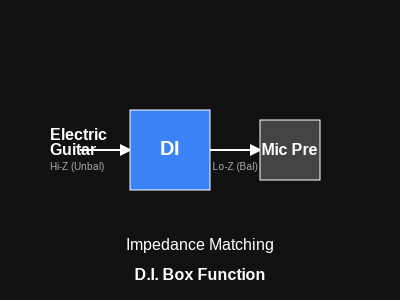
Direct injection – converts unbalanced instruments jack signals to be converted to a balanced XLR signal. Better signal to noise ratio and less chance of electromagnetic interference into the audio signal |
Recording & Mixing Guide → |
|
Mixing desk
Studio Hardware |
Turns multiple inputs into one stereo output. Enables you to add effects to separate channels such as EQ, pan, gain etc. |
Audio Mixers Guide → |
|
Guitar pedals
Studio Hardware |
Foot-controlled effects units for guitars/bass. Can be daisy-chained with ¼ inch guitar jack leads. Connected in SERIES. |
Recording & Mixing Guide → |
|
Outboard effects (external effects unit)
Studio Hardware |
Physical effects units. Signal affected BEFORE interface/DAW. Uses the INSERTS on a mixing desk |
Recording & Mixing Guide → |
|
Digital Multi-tracker
Studio Hardware |
Precursor to computer based DAW’s – piece of hardware that looks like a mixer with mixing capabilities and a hard-disk recorder attached. |
Recording & Mixing Guide → |
|
Drum machine
Studio Hardware |
A type of sampler/synth sequencer or hybrid which has presets specifically designed to sound like drums. |
Recording & Mixing Guide → |
|
Sampler
Studio Hardware |
Stores/triggers/edits pre-recorded sounds. An AKAI S1000 is an example |
Recording & Mixing Guide → |
|
Reverberation Unit
Studio Hardware |
Hardware reverb unit |
Reverb Guide → |
|
Compressor
Studio Hardware |
Hardware compressor |
Recording & Mixing Guide → |
|
EQ Unit
Studio Hardware |
Hardware EQ Unit that Boost/cut audio frequencies. |
Recording & Mixing Guide → |
|
Monitors / ‘Monitoring’
Other Things Found in the Studio |
The speakers or headphones that are used to listen to the output of your mixer or DAW |
Recording & Mixing Guide → |
|
Patch bay
Other Things Found in the Studio |
A panel in the studio used for connecting different effects units/instruments. Stops you having to plug things in and out from the back. |
Audio Mixers Guide → |
|
Control room
Other Things Found in the Studio |
Where the sound engineer can monitor recording from the live room where the musicians are playing and mix. |
Recording & Mixing Guide → |
|
Acoustic shields (or screen)/baffles
Other Things Found in the Studio |
Absorb sounds so there is less unwanted room noise/reverb. Also separates the sounds from different instruments playing at the same time. |
Recording & Mixing Guide → |
|
Sound/Isolation Booth
Other Things Found in the Studio |
Soundproof and very ‘dry’ room for recording soloists. Acoustically treated and insulated. ‘Room within a room’ which removes spillage. Most useful for drums (which spill a lot) and vocals (which need to be isolated) |
Recording & Mixing Guide → |
|
TRS Jack
Other Things Found in the Studio |
Tip/Ring/Sleeve (TRS). See 2.3 leads and signals for more info |
Recording & Mixing Guide → |
|
XLR (cannon)
Other Things Found in the Studio |
Balanced 3 pin lead. Used for mics and reduces hum. See 2.3. |
Recording & Mixing Guide → |
|
Mic Stand
Other Things Found in the Studio |
A stand. For mics. |
Recording & Mixing Guide → |
|
Clip
Other Things Found in the Studio |
The important bit that attaches the microphone to the mic stand that everyone forgets about. |
Recording & Mixing Guide → |
|
Pop Shield
Other Things Found in the Studio |
Filters out ‘plosives and sibilance when singers sing |
Recording & Mixing Guide → |
|
Jack Lead
Other Things Found in the Studio |
Used to connect guitars to amps. It is unbalanced (not TRS) |
Recording & Mixing Guide → |
|
Looms/stage box or ‘multi-core’
Other Things Found in the Studio |
Found in the live room and on a live stage. Extension lead for audio. Enables you to plug mics into the interface from a distance. |
Recording & Mixing Guide → |
|
‘Return’
Other Things Found in the Studio |
Enables the performer to hear guide tracks and sounds via headphones or monitors. |
Recording & Mixing Guide → |
|
MIDI
Programming Environments |
Musical Instrument Digital Interface. A protocol (computer language) which expresses musical performance in numerical form (binary). Allows all DAWs and synths/samplers made by different manufacturers to communicate through a globally understood language. |
Recording & Mixing Guide → |
|
Open Sound Control (OSC)
Programming Environments |
A new protocol invented for synths and computers to communicate. Messages are transported across the internet using UDP (User Datagram Protocol) instead of MIDI allowing for more accuracy and flexibility. |
Recording & Mixing Guide → |
|
Ableton Live
New and Emerging Software on Music Production |
Cross platform (PC & Mac). Has an amazing ‘elastic audio’ function that gives you great manipulation of audio samples. It’s a ‘sampler on steroids’ |
DAW & Mixers Guide → |
|
MAWs
New and Emerging Software on Music Production |
Mobile audio workstation. E.g. Garage band on your phone. |
DAW & Mixers Guide → |
|
FL Studio
New and Emerging Software on Music Production |
PC based DAW that has some interesting functions and has an unusual layout that uses pattern based sequencing. |
DAW & Mixers Guide → |
|
Steinberg Cubase
New and Emerging Software on Music Production |
One of the first sequencers out there and what all modern sequencers are based on. A bit clunky these days. |
DAW & Mixers Guide → |
|
Studio One
New and Emerging Software on Music Production |
A pattern based sequencer from Presonus. Works with presonus hardware |
DAW & Mixers Guide → |
Cables, Connectors & Signal Levels
Balanced vs unbalanced wiring, XLR, TRS, DI box impedance, and mic/line/speaker voltages.
10 Terms
Key Diagrams & Hardware Guides
Examiner-verified signal flow, schematics, and equipment photos for this module.
🔍 Enlarge
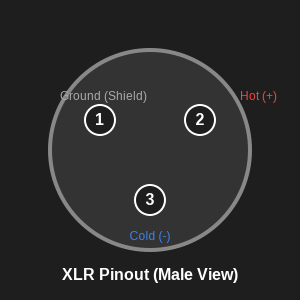
Balanced XLR 3-Pin Pinout
Pin 1: Ground/Shield, Pin 2: Hot (+ polarity), Pin 3: Cold (- inverted polarity) for common-mode noise cancellation.

🔍 Enlarge
Balanced Differential Noise Cancellation
External electromagnetic interference picked up equally on hot and cold conductors is cancelled at the differential input.
🔍 Enlarge
Direct Injection (DI Box) Circuit
Transforms unbalanced, high-impedance instrument outputs into balanced, low-impedance mic signals with galvanic ground lift.
| Term | Examiner Definition & Technical Explanation | Study Guide |
|---|---|---|
|
Balanced Cable
Cables & Connections |
A cable containing three conductors: Hot (+), Cold (- inverted phase), and Ground shield. At the receiving differential amplifier, the cold signal is flipped and added to hot, doubling signal strength and completely cancelling induced electromagnetic hum (common-mode rejection). |
Recording & Mixing Guide → |
|
Unbalanced Cable
Cables & Connections |
A cable with two conductors: signal core and ground shield. Prone to picking up electromagnetic noise over runs longer than 5 metres (e.g. 1/4″ TS guitar leads, RCA phono). |
Recording & Mixing Guide → |
|
XLR (Cannon)
Cables & Connections |
3-pin locking balanced audio connector standard for microphone signals and professional line-level connections. Pin 1: Ground/Shield, Pin 2: Hot (+), Pin 3: Cold (-). |
Recording & Mixing Guide → |
|
TRS Jack
Cables & Connections |
Tip-Ring-Sleeve 1/4″ connector used for balanced mono signals (Tip=Hot, Ring=Cold, Sleeve=Ground) or unbalanced stereo headphones (Tip=Left, Ring=Right, Sleeve=Ground). |
Recording & Mixing Guide → |
|
TS Jack
Cables & Connections |
Tip-Sleeve 1/4″ connector used for unbalanced mono instrument connections such as electric guitars, basses, and pedal patch leads. |
Recording & Mixing Guide → |
|
Speakon
Cables & Connections |
Heavy-duty locking connector designed by Neutrik for high-current connections between power amplifiers and passive loudspeakers. Prevents accidental disconnection and short circuits. |
Recording & Mixing Guide → |
|
Mic Level
Signal Levels |
Very low voltage signal generated by microphones (typically -60 to -40 dBu), requiring a pre-amplifier to boost it up to line level before processing. |
Recording & Mixing Guide → |
|
Line Level
Signal Levels |
Standard operating signal level in audio recording equipment. Professional line level is +4 dBu (1.228V RMS); consumer line level is -10 dBV (0.316V RMS). |
Recording & Mixing Guide → |
|
Instrument Level (High-Z)
Signal Levels |
High-impedance signal produced by passive electric guitar/bass pickups, requiring a high-input impedance (Hi-Z) or DI box to avoid high-frequency loss and tone loading. |
Recording & Mixing Guide → |
|
Speaker Level
Signal Levels |
High voltage and high current signal output by a power amplifier to drive loudspeaker voice coils. Must never be connected to mic or line inputs. |
Recording & Mixing Guide → |
Microphones, Transducers & Micing Techniques
Cardioid, figure-8, and omni polar patterns, dynamic, condenser, ribbon mechanics, and stereo micing.
50 Terms
Key Diagrams & Hardware Guides
Examiner-verified signal flow, schematics, and equipment photos for this module.
🔍 Enlarge
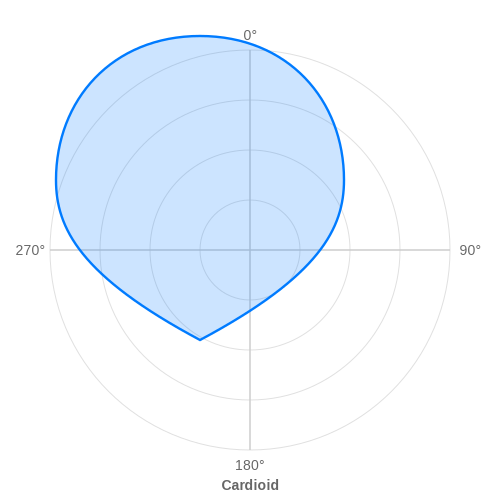
Cardioid Polar Pattern
Directional pickup with maximum sensitivity at 0° on-axis and complete null rejection at 180° rear.
🔍 Enlarge
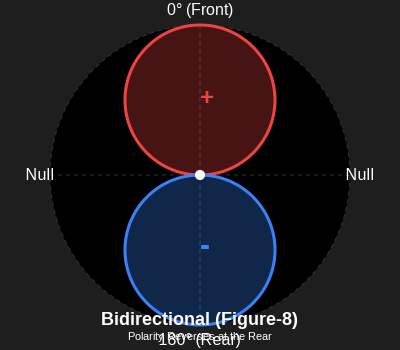
Figure-8 (Bidirectional)
Equal sensitivity to front (0°) and rear (180°), with 100% rejection at the 90° and 270° sides.
🔍 Enlarge
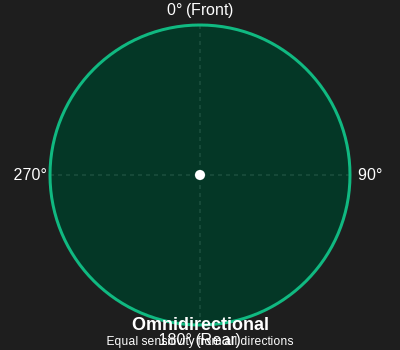
Omnidirectional Polar Pattern
Spherical 360° sensitivity capturing room acoustics evenly with zero proximity effect.
🔍 Enlarge
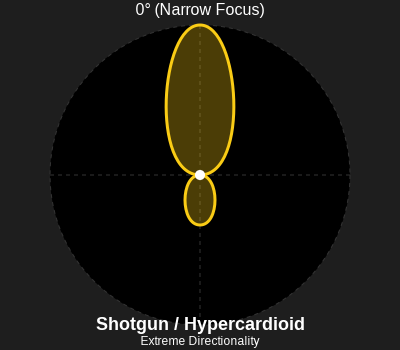
Supercardioid Pattern
Narrower front pickup than cardioid with tighter side rejection and a small rear sensitivity lobe.

🔍 Enlarge
Dynamic Moving-Coil Construction
Diaphragm attached to copper coil suspended in magnetic field; robust with high SPL handling.
🔍 Enlarge
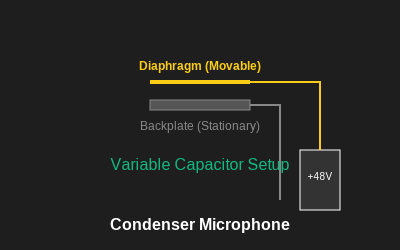
Condenser Electrostatic Construction
Lightweight gold-sputtered diaphragm and fixed backplate forming a capacitor requiring +48V phantom power.

🔍 Enlarge
Ribbon Velocity Construction
Corrugated aluminum ribbon suspended between magnetic poles offering smooth high-frequency response.
🔍 Enlarge
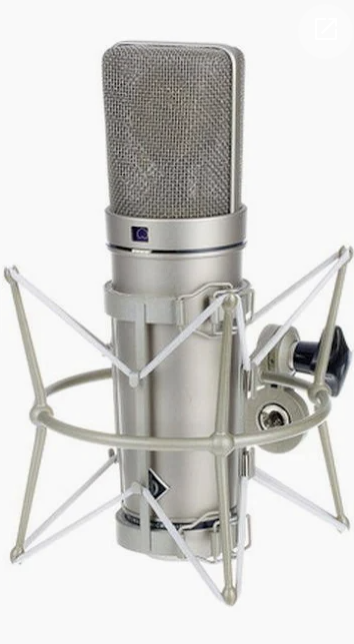
Neumann U87 Multi-Pattern Condenser
Industry-standard large diaphragm studio condenser featuring switchable omni, cardioid, and figure-8 patterns.
🔍 Enlarge
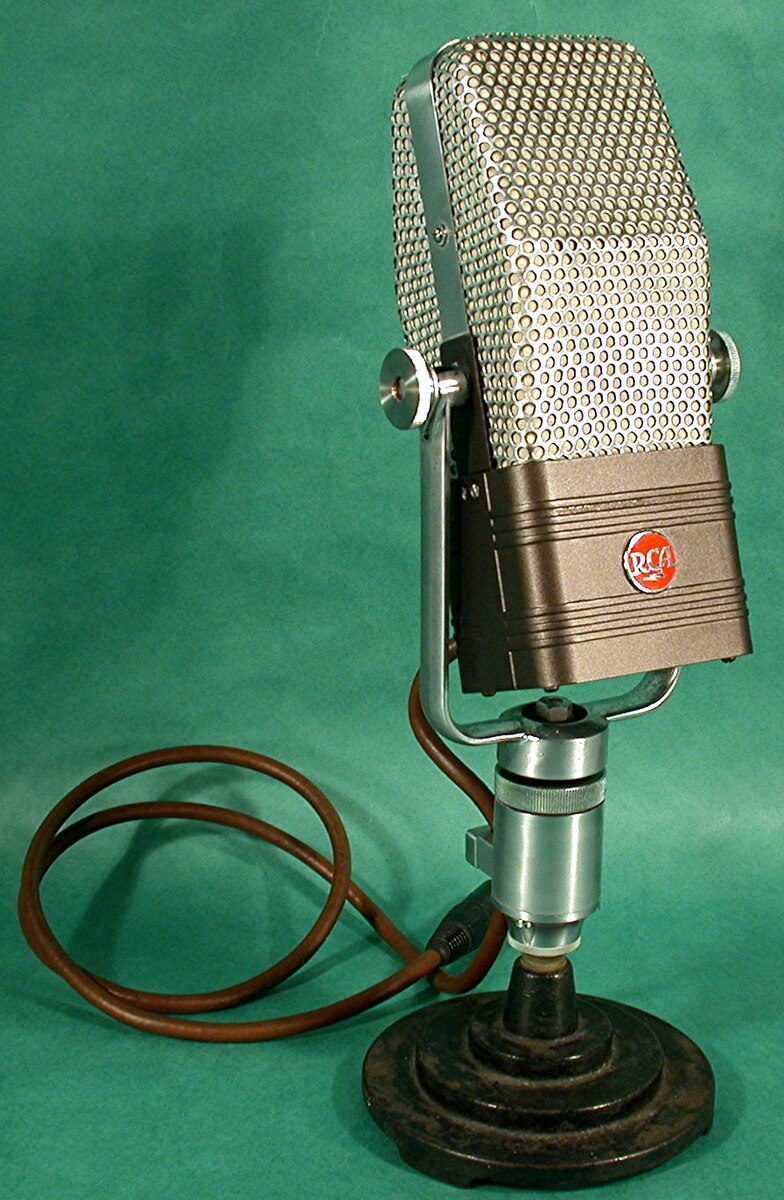
RCA 44-BX Classic Ribbon Microphone
Historic figure-8 velocity ribbon microphone famous for smooth vintage warmth and creamy vocal tone.
🔍 Enlarge
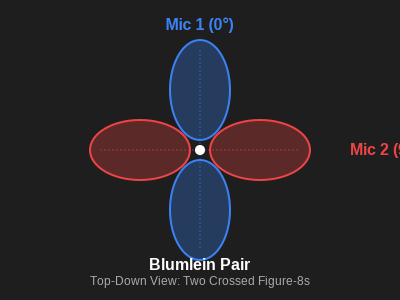
Blumlein Coincident Stereo Pair
Two bidirectional figure-8 microphones angled at 90° with coincident capsules for realistic stereo imaging.
🔍 Enlarge
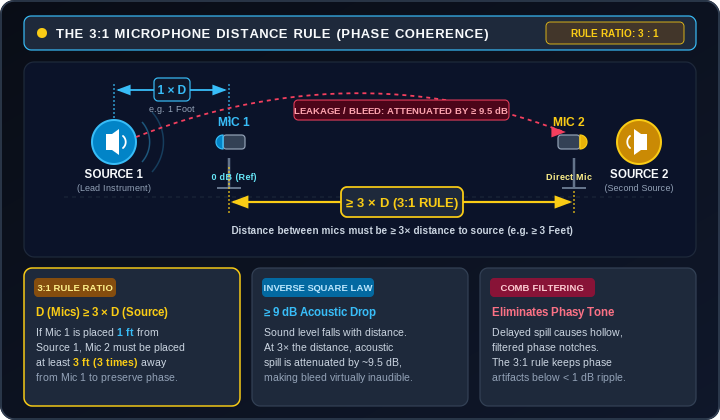
The 3:1 Microphone Placement Rule
Distance between microphones must be at least 3 times the distance from source to mic to avoid phase comb filtering.

🔍 Enlarge
Acoustic Guitar Micing Setup
Cardioid mic pointed at the 12th fret (15-30cm away) balancing finger attack and body resonance without boomy soundhole buildup.
🔍 Enlarge
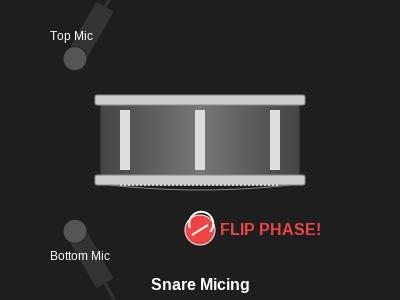
Snare Drum Micing (Top & Bottom)
Top mic captures crack and stick transient; bottom mic captures snare wires (with phase inversion switch engaged).
| Term | Examiner Definition & Technical Explanation | Study Guide |
|---|---|---|
|
Signal-to-noise ratio
Gain |
If a sound is recorded too quietly then you will have a poor signal to noise ratio. If you record at a good level but without clipping or distorting then that is a good signal to noise ratio. |
Recording & Mixing Guide → |
|
Clipping
Gain |
What happens when you have too much input gain and the sound becomes distorted. |
Recording & Mixing Guide → |
|
Interference and hiss
Gain |
This happens when you don’t want it. There is noise in the audio signal. It could be interference from a light or computer, or it could be a dodgy guitar lead (probably is) |
Recording & Mixing Guide → |
|
Pre-amp controls
Gain |
Usually an input gain and output level control. Possibly have a PAD button for high level inputs and +48 Phantom power for condenser microphones |
Recording & Mixing Guide → |
|
Phantom Power
Gain |
How condenser microphones are powered from a mixing desk, D.I Box or audio interface. Sometimes referred to as +48V |
Recording & Mixing Guide → |
|
Pad
Gain |
Used to make a microphone less sensitive so they are less likely to clip on input – useful for loud signals (Drums) |
Recording & Mixing Guide → |
|
‘Gain Structure’
Gain |
A good gain structure is when all the different input and output levels are nominal and not too loud or too quiet. |
Recording & Mixing Guide → |
|
Capacitance/Condenser
Mics and Their Characteristics |
Sensitive, accurate microphone requiring phantom power (+48V). Best for vocals and acoustic instruments in studio. Captures detail and high frequencies well. |
Recording & Mixing Guide → |
|
Dynamic Mic
Mics and Their Characteristics |
Robust, less sensitive microphone needing no power. Best for loud sources (drums, guitar amps) and live use. Can handle high SPL. |
Recording & Mixing Guide → |
|
Cradle
Mics and Their Characteristics |
Shock mount. Isolates microphone from vibrations and handling noise. Essential for sensitive condenser mics. |
Recording & Mixing Guide → |
|
Rumble (Low pass) Filter
Mics and Their Characteristics |
High-pass filter (usually around 80-100Hz) to remove unwanted low frequency noise like air conditioning, traffic, or handling noise. |
Recording & Mixing Guide → |
|
Transient sounds
Mics and Their Characteristics |
Sounds with fast attack like drums or percussion. Condensers capture these better than dynamics due to faster diaphragm response. |
Recording & Mixing Guide → |
|
Polar Pick-up pattern
Mics and Their Characteristics |
The directional sensitivity of a microphone shown as a polar diagram. Shows which directions the mic picks up sound from. |
Recording & Mixing Guide → |
|
Cardioid
Mics and Their Characteristics |
Heart-shaped pickup pattern. Picks up sound from front, rejects from rear. Most common mic pattern. Good for isolating sound sources. |
Recording & Mixing Guide → |
|
Figure of 8 pattern
Mics and Their Characteristics |
Picks up equally from front and back, rejects from sides (90°). Good for two sources facing each other or room ambience. |
Recording & Mixing Guide → |
|
Hyper-cardioid
Mics and Their Characteristics |
Tighter than cardioid at front with small pickup lobe at rear. Better rejection from sides. Good for isolating sources in loud environments. |
Recording & Mixing Guide → |
|
Omni-directional
Mics and Their Characteristics |
Picks up equally from all directions (360°). Good for room ambience, orchestral recording, or natural sound. No proximity effect. |
Recording & Mixing Guide → |
|
Frequency Response
Mics and Their Characteristics |
The range of frequencies a mic can accurately capture. Measured in Hz. Flat response = accurate. Peaks/dips = coloured sound. |
Recording & Mixing Guide → |
|
Proximity Effect
Mics and Their Characteristics |
Bass frequency boost when sound source is very close (under 6 inches) to directional mics (cardioid/figure-8). Does not affect omni mics. |
Recording & Mixing Guide → |
|
Background noise
Micing Techniques |
Unwanted sound in recording environment. Minimize with directional mics, acoustic treatment, and careful mic placement. |
Recording & Mixing Guide → |
|
Spill
Micing Techniques |
When other sounds are picked up beyond the intended sound source. Unavoidable with multiple instruments but minimized with close micing and cardioid patterns. |
Recording & Mixing Guide → |
|
Plosives/sibilance
Micing Techniques |
Plosives = burst of air from ‘p’ and ‘b’ sounds causing loud pops. Sibilance = harsh ‘s’ and ‘t’ sounds. Use pop shield and de-esser to control. |
Recording & Mixing Guide → |
|
Ambient Recording
Micing Techniques |
Recording the natural sound of a space. Use omni mics or spaced pair positioned further from source to capture room acoustics. |
Recording & Mixing Guide → |
|
Close Micing
Micing Techniques |
Placing microphone very close (1-6 inches) to sound source for maximum isolation and detail. Reduces room sound and spill. |
Recording & Mixing Guide → |
|
On/Off Axis
Micing Techniques |
On-axis = mic pointing directly at source (bright). Off-axis = mic angled away (warmer, less bright). Use off-axis to reduce harshness. |
Recording & Mixing Guide → |
|
Stereo Pair
Micing Techniques |
Two microphones used together to create stereo image. Common techniques: X/Y (coincident), spaced pair (A/B), mid-side (M/S). |
Recording & Mixing Guide → |
|
Electric Guitar
How to Mic Up Instruments |
SM57, Royer R-121 / Cardioid |
Electric Guitar Guide → |
|
Bass Guitar
How to Mic Up Instruments |
AKG D112, RE20 / Cardioid |
Bass Guitar Guide → |
|
Acoustic Guitar
How to Mic Up Instruments |
Small diaphragm condenser (AKG C451) / Cardioid |
Recording & Mixing Guide → |
|
Drum Overheads
How to Mic Up Instruments |
Small diaphragm condensers or ribbon mics / Cardioid or Figure-8 |
Recording & Mixing Guide → |
|
Snare
How to Mic Up Instruments |
SM57 (top) + SM57/condenser (bottom) / Cardioid |
Recording & Mixing Guide → |
|
Toms
How to Mic Up Instruments |
Sennheiser MD 421 or SM57 / Cardioid |
Recording & Mixing Guide → |
|
Kick Drum
How to Mic Up Instruments |
AKG D112, Beta 52, or RE20 / Cardioid |
Recording & Mixing Guide → |
|
Cello
How to Mic Up Instruments |
Large diaphragm condenser / Cardioid |
Recording & Mixing Guide → |
|
Violin
How to Mic Up Instruments |
Small diaphragm condenser / Cardioid |
Recording & Mixing Guide → |
|
Double Bass
How to Mic Up Instruments |
Large diaphragm condenser or DI/pickup / Cardioid |
Recording & Mixing Guide → |
|
Brass (Trumpet/Trombone)
How to Mic Up Instruments |
Dynamic (SM57) or condenser / Cardioid |
Recording & Mixing Guide → |
|
Flute/Clarinet
How to Mic Up Instruments |
Small diaphragm condenser / Cardioid |
Recording & Mixing Guide → |
|
Saxophone
How to Mic Up Instruments |
Dynamic or condenser / Cardioid |
Recording & Mixing Guide → |
|
Vocals
How to Mic Up Instruments |
Large diaphragm condenser (Neumann U87, AKG C414) / Cardioid |
Recording & Mixing Guide → |
|
Backing Vocals
How to Mic Up Instruments |
Condenser or dynamic / Cardioid |
Recording & Mixing Guide → |
|
Congas
How to Mic Up Instruments |
Dynamic (SM57) or small diaphragm condenser / Cardioid |
Recording & Mixing Guide → |
|
Xylophones/Vibes
How to Mic Up Instruments |
Small diaphragm condenser pair / Cardioid |
Recording & Mixing Guide → |
|
Spaced/AB Pair
Advanced Micing Techniques |
Two mics (omni/cardioid) placed 3-10 feet apart pointing at source. Captures wide, natural stereo image but can have phase issues. Good for orchestras. |
Recording & Mixing Guide → |
|
X/Y or coincident pair
Advanced Micing Techniques |
Two cardioid mics at 90° angle with capsules as close as possible. Mono-compatible stereo with good imaging. No phase problems. |
Recording & Mixing Guide → |
|
M/S (mid side)
Advanced Micing Techniques |
One cardioid (mid) pointing at source, one figure-8 (side) perpendicular at 90°. Allows adjustment of stereo width in post-production. Excellent mono compatibility. |
Recording & Mixing Guide → |
|
Electro-magnetic induction
How Mics Actually Work |
In dynamic mics: Moving a conductor (diaphragm attached to coil) through magnetic field creates electrical current proportional to diaphragm movement. |
Recording & Mixing Guide → |
|
Front/back plate
How Mics Actually Work |
In condenser mics: front plate (diaphragm) moves with sound waves, back plate is fixed. Changing distance creates variable capacitance which generates electrical signal. |
Recording & Mixing Guide → |
|
Transducer
How Mics Actually Work |
Device that converts one form of energy to another. Microphones convert acoustic energy (sound pressure waves) to electrical energy (voltage). |
Recording & Mixing Guide → |
|
Diaphragm/membrane
How Mics Actually Work |
Thin material (plastic, metal) that vibrates sympathetically with sound waves. Its movement is converted to electrical signal by mic mechanism. |
Recording & Mixing Guide → |
Synthesis Architecture & Sound Design
Subtractive signal path (VCO → VCF → VCA), harmonic waveforms, filter cutoff, resonance, LFO, and ADSR envelopes.
37 Terms
Key Diagrams & Hardware Guides
Examiner-verified signal flow, schematics, and equipment photos for this module.
🔍 Enlarge
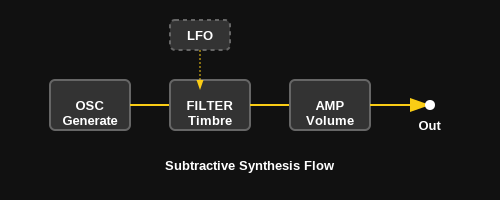
Subtractive Synthesis Architecture
Classic signal flow: Oscillators (VCO) generate harmonics → Filter (VCF) shapes timbre → Amplifier (VCA) shapes volume.
🔍 Enlarge
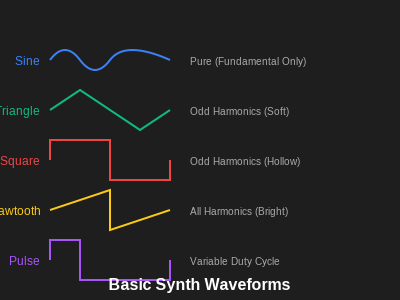
Synthesis Harmonic Waveforms
Sine (fundamental only), Triangle (odd harmonics falling off fast), Sawtooth (all harmonics), Square/Pulse (odd harmonics).
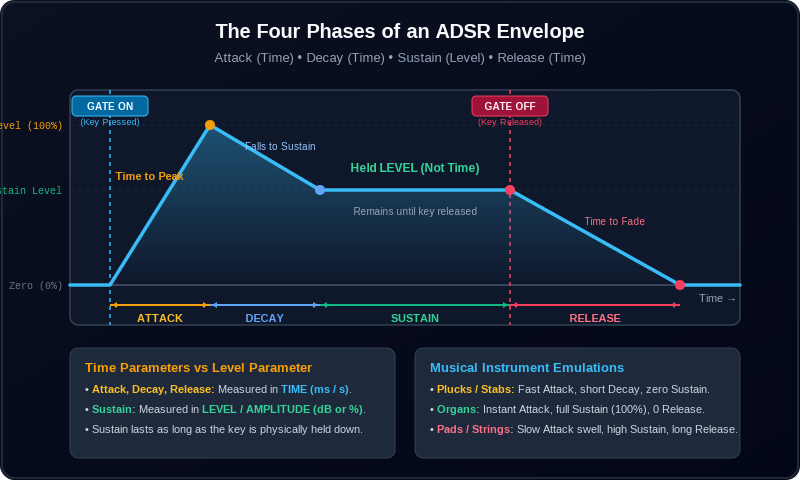
🔍 Enlarge
ADSR Envelope Generators
Attack time, Decay time, Sustain level, and Release time modulating amplitude or filter cutoff.
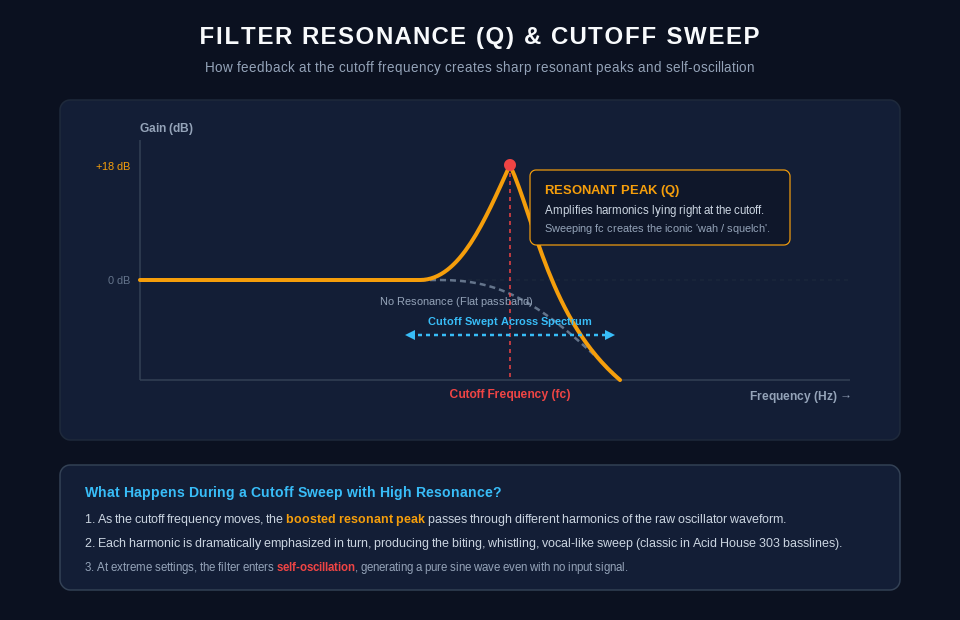
🔍 Enlarge
Filter Resonance & Cutoff
Resonant peak (Q) boosting frequencies immediately surrounding the cutoff point to create synthetic bite.
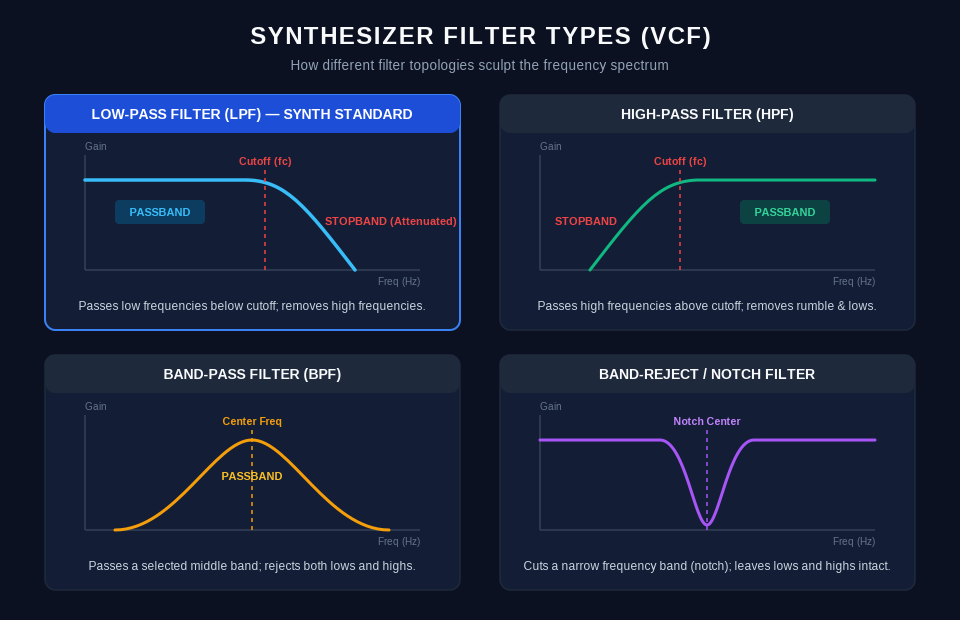
🔍 Enlarge
Filter Response Topologies
Low-Pass (LPF), High-Pass (HPF), Band-Pass (BPF), and Notch filtering curves.
🔍 Enlarge
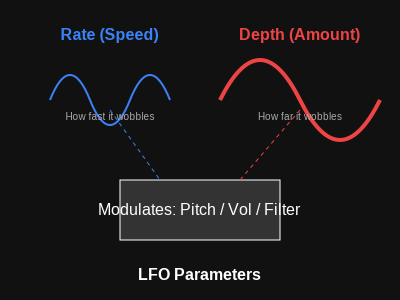
LFO Modulation (Rate & Depth)
Low Frequency Oscillator modulating pitch (vibrato), volume (tremolo), or filter cutoff (wah-wah).
🔍 Enlarge
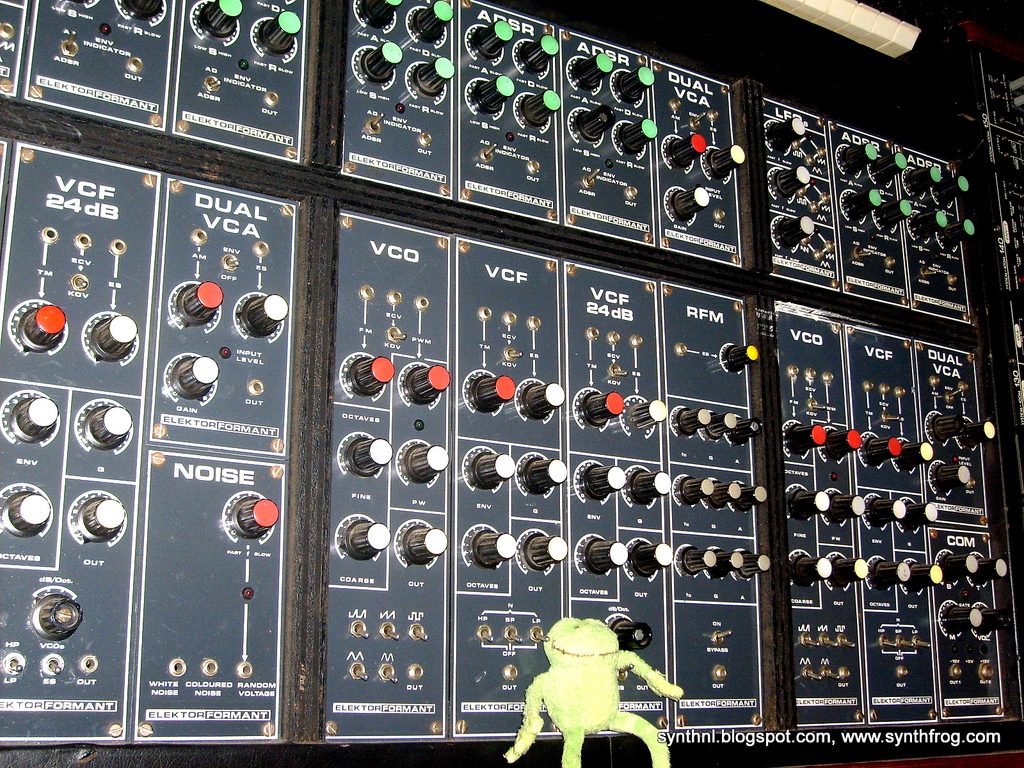
Vintage Modular Synthesizer
Analogue hardware modular synth utilizing physical patch cables to route control voltages (CV/Gate) between modules.
| Term | Examiner Definition & Technical Explanation | Study Guide |
|---|---|---|
|
Oscillator
Parts of a Synthesiser |
Generates an electrical waveform. Used in synths. Several oscillators can be blended/pitched to create different timbres. |
Synthesizer Guide → |
|
Cutoff/frequency
Parts of a Synthesiser |
The point (in Hz) at which the filter starts working. Below cutoff in LPF, above cutoff in HPF, or centered in BPF. |
Synthesizer Guide → |
|
Resonance
Parts of a Synthesiser |
A boost at the cutoff frequency of a filter. Creates a whistling, resonant sound. Adds emphasis and character. |
Synthesizer Guide → |
|
Envelope (Amplitude)
Parts of a Synthesiser |
Controls how sound changes over time. ADSR = Attack, Decay, Sustain, Release. Shapes volume envelope. |
Synthesizer Guide → |
|
Sawtooth Wave
Parts of a Synthesiser |
Bright, buzzy waveform with all harmonics. Good for brass, strings, and basses. Very versatile. |
Synthesizer Guide → |
|
Ramp Wave
Parts of a Synthesiser |
Same as sawtooth but opposite direction (ramps down instead of up). Sounds identical to sawtooth. |
Synthesizer Guide → |
|
Sine Wave
Parts of a Synthesiser |
Pure tone with no harmonics. Fundamental frequency only. Sounds smooth and flute-like. |
Synthesizer Guide → |
|
Triangle wave
Parts of a Synthesiser |
Odd harmonics only. Softer than square wave. Good for flutes and soft leads. |
Synthesizer Guide → |
|
Square Wave
Parts of a Synthesiser |
Hollow, clarinet-like sound. Only odd harmonics. Good for leads and bass. |
Synthesizer Guide → |
|
White noise
Parts of a Synthesiser |
Hissing sound containing all frequencies at equal amplitude. Used for cymbals, wind effects, and sound design. |
Synthesizer Guide → |
|
Pink Noise
Parts of a Synthesiser |
All frequencies but with emphasis on lower frequencies (-3dB per octave). More natural sounding than white noise. Sounds like rumbling. |
Synthesizer Guide → |
|
PWM (Pulse width modulation)
Parts of a Synthesiser |
A square wave with adjustable duty cycle (time voltage is high vs low). Can be modulated using an LFO. Particularly good for creating synth string sounds. |
Synthesizer Guide → |
|
LFO
Parts of a Synthesiser |
Low Frequency Oscillator (0-25Hz). Too low to hear. Can be assigned to modulate parameters like pitch (vibrato), volume (tremolo), filter (wah). |
Synthesizer Guide → |
|
Pitch Bend
Parts of a Synthesiser |
Wheel on MIDI controller that varies pitch of sound up or down. Range typically set in semitones (usually ±2 or ±12). |
Synthesizer Guide → |
|
Modulation Wheel
Parts of a Synthesiser |
Wheel on side of MIDI controller that can be routed/assigned to any parameter for real-time automation. Often controls vibrato depth. |
Synthesizer Guide → |
|
Assign/Route
Parts of a Synthesiser |
When you connect different parts of synthesizer or effects unit to each other. Modular synths use patch cables to physically route signals. |
Synthesizer Guide → |
|
Arpeggiator
Parts of a Synthesiser |
Software that turns chord into broken chord (arpeggio). Can change octave range and direction (up, down, up/down, random). |
Synthesizer Guide → |
|
Amplifier
Parts of a Synthesiser |
Part of synthesizer that amplifies signal. Final stage in synthesis process before output. |
Synthesizer Guide → |
|
Voices
Other Parameters of a Synthesiser |
Number of notes that can be played simultaneously. Monophonic = only one voice/note can be played at once. |
Synthesizer Guide → |
|
Glide (secs)
Other Parameters of a Synthesiser |
Time in seconds to slide from one note to another. Also known as portamento. Creates smooth pitch transitions. |
Synthesizer Guide → |
|
Drive
Other Parameters of a Synthesiser |
Overdrive on filter that boosts signal. Adds warmth, saturation and harmonic content. |
Synthesizer Guide → |
|
Legato
Other Parameters of a Synthesiser |
Setting where attack/decay envelopes not retriggered after first note is played. Mimics slurring notes. Particularly noticeable with filter envelopes. |
Synthesizer Guide → |
|
Blend
Other Parameters of a Synthesiser |
Amount of signal coming from each oscillator (e.g. 50% square, 50% sine). Mixes different waveforms together. |
Synthesizer Guide → |
|
Series/Parallel (filtering)
Other Parameters of a Synthesiser |
Routing option for filters. Series = one filter after another. Parallel = both filters at same time. |
Synthesizer Guide → |
|
Detuning
Other Parameters of a Synthesiser |
Makes all oscillators slightly out of tune with each other. Creates thicker sound as waves go out of phase, creating ‘beating’. |
Synthesizer Guide → |
|
Coarse/fine tuning
Other Parameters of a Synthesiser |
Coarse = tuning by semitones (12 per octave). Fine = tuning by cents (100 per semitone). |
Synthesizer Guide → |
|
Cents
Other Parameters of a Synthesiser |
Increments between semitones. 1/100th of a semitone. 50 cents = quarter-tone (microtonal). |
Synthesizer Guide → |
|
2’/4’/8’/16’/32′ (feet)
Other Parameters of a Synthesiser |
Octaves on synth. Measured in ‘feet’, as originally organ pipes were measured by their length in feet. Middle C (261Hz) = 2′ |
Synthesizer Guide → |
|
S/H (Sample and Hold)
Other Parameters of a Synthesiser |
Samples a wave (e.g. sine) and holds signal at sampled value until next sample is taken. Creates stepped, random-sounding modulation. |
Synthesizer Guide → |
|
Polyphonic
Other Parameters of a Synthesiser |
Synthesisers that can play more than one note at once. Typical voice counts: 4, 8, 16, or unlimited (digital). |
Synthesizer Guide → |
|
Bender Range
Other Parameters of a Synthesiser |
Measured in semitones. How many semitones the pitch bend wheel will bend by. Typically ±2 semitones or ±12 semitones (1 octave). |
Synthesizer Guide → |
|
VCO/VCF
Other Parameters of a Synthesiser |
Voltage Controlled Oscillator/Filter. The name for oscillators and filters on analogue synths. |
Synthesizer Guide → |
|
DCO/DCF
Other Parameters of a Synthesiser |
Digitally Controlled Oscillator/Filter. The name for oscillators and filters on digital synths. More stable tuning. |
Synthesizer Guide → |
|
Subtractive synthesis
Other Parameters of a Synthesiser |
Using harmonically complex oscillators (sawtooth, square) then putting them through filters to shape sound further. Most common type. |
Synthesizer Guide → |
|
Additive Synthesis
Other Parameters of a Synthesiser |
Creating complex timbres by using multiple oscillators generating simple waveforms (sine waves) at different frequencies and amplitudes. |
Synthesizer Guide → |
|
Filter Envelope
Other Parameters of a Synthesiser |
When an ADSR envelope is assigned to filter cutoff frequency. Creates dynamic filter movement over time. |
Synthesizer Guide → |
|
FM synthesis
Other Parameters of a Synthesiser |
Frequency Modulation. Control output frequency of one oscillator (carrier) with another oscillator (modulator). Can produce elaborate timbral changes. Yamaha DX7 famous example. |
Synthesizer Guide → |
Sampling & Digital Audio Processing
Sample rate, bit depth, Nyquist theorem, DC offset, normalization, truncating, and crossfade loops.
22 Terms
Key Diagrams & Hardware Guides
Examiner-verified signal flow, schematics, and equipment photos for this module.
🔍 Enlarge
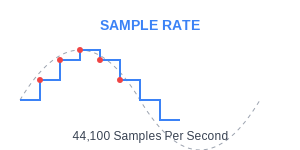
Sample Rate & Nyquist Staircase
Frequency sampling: audio must be sampled at least twice its highest frequency component to prevent aliasing.
🔍 Enlarge
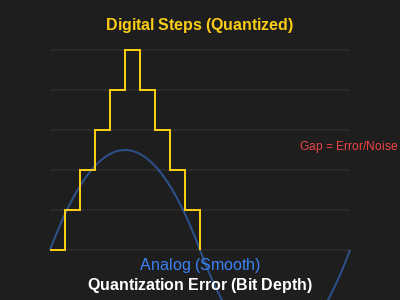
Bit Depth & Quantization Steps
Amplitude resolution: higher bit depth increases dynamic range (16-bit = 96dB, 24-bit = 144dB) and lowers noise floor.
🔍 Enlarge
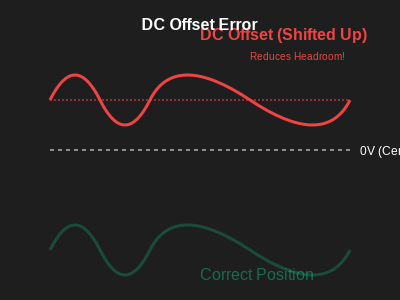
DC Offset Waveform Correction
Centering vertical waveform displacement back to the 0V baseline to prevent clicks during audio edits and restore headroom.
🔍 Enlarge
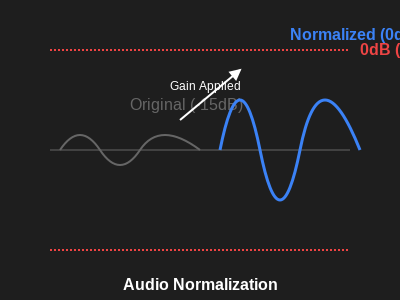
Sample Peak Normalization
Digital gain scaling that boosts the highest audio peak to 0 dBFS (or defined ceiling) across the file.
🔍 Enlarge
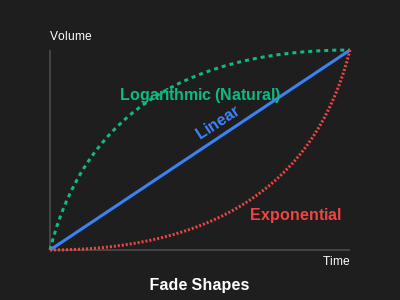
Audio Crossfade Geometries
Linear, logarithmic, and equal-power crossfades preventing pops and maintaining constant perceived volume.
🔍 Enlarge
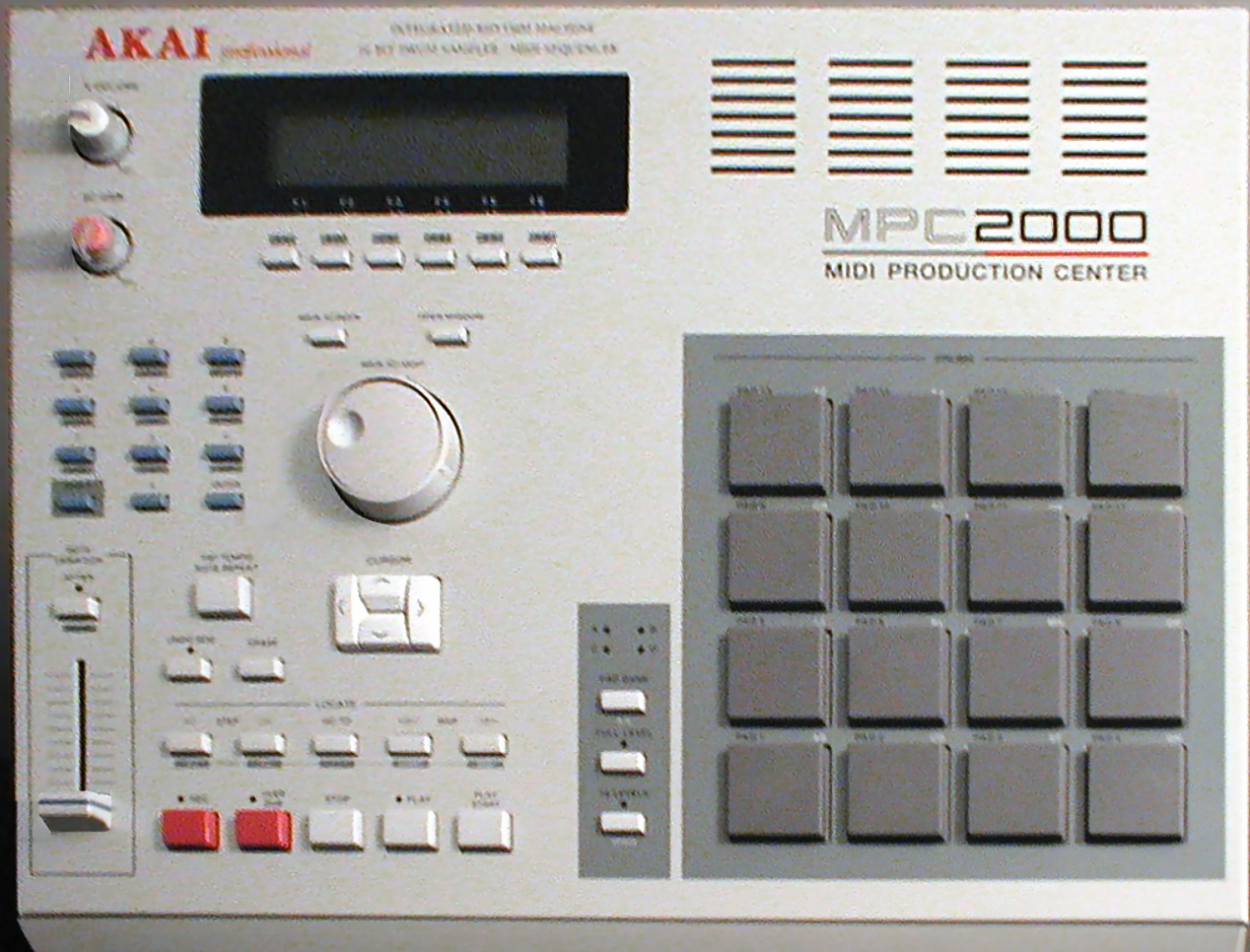
Akai MPC Sampling Workstation
Iconic 16-pad hardware sampler/sequencer that defined hip-hop beatmaking and rhythmic audio groove.
| Term | Examiner Definition & Technical Explanation | Study Guide |
|---|---|---|
|
Cutting/trimming/truncating
Editing Samples |
Editing the length of a sample by removing unwanted sections from the start or end. |
Sampling & MIDI Guide → |
|
Tuning samples
Editing Samples |
Pitch affected by speeding up or slowing down samples. Faster = higher pitch, slower = lower pitch. |
Sampling & MIDI Guide → |
|
Looping
Editing Samples |
Repeating a section of sample to create endless sustained sound without clicks. Used for sustaining instrument notes. |
Sampling & MIDI Guide → |
|
Cross/x-fade
Editing Samples |
Fade out the end of loop as you fade in the beginning so there’s no audible click. Creates smooth, seamless loop point. |
Sampling & MIDI Guide → |
|
Zero-crossing point
Editing Samples |
Slicing sample when amplitude is 0 (where waveform crosses X-axis). Avoids clicks when cutting or looping audio. |
Sampling & MIDI Guide → |
|
Pitch Mapping/Transposing
Editing Samples |
Using pitch shift insert to change pitch without speeding up or slowing down sample. Preserves timing. |
Sampling & MIDI Guide → |
|
Reversing
More Sampling Parameters |
Playing the sample backwards. Creates reverse reverb effect and interesting, unusual textures. |
Sampling & MIDI Guide → |
|
Stuttering
More Sampling Parameters |
Re-triggering the beginning of sample repeatedly. Creates glitchy, rhythmic, modern effect. |
Sampling & MIDI Guide → |
|
ADSR
More Sampling Parameters |
You can assign synthesizer ADSR envelopes to audio samples for dynamic control over amplitude. |
Synthesizer Guide → |
|
Pitch key zones
More Sampling Parameters |
Multi-sampling: where one sample is stretched over as many notes as possible without affecting timbre adversely. |
Sampling & MIDI Guide → |
|
Velocity Layering
More Sampling Parameters |
Different samples assigned to different velocity ranges because there’s a difference in timbre at different playing dynamics. X-fade between samples for smooth transitions. |
Sampling & MIDI Guide → |
|
Time Stretching
More Sampling Parameters |
Change length of sample but pitch stays same. Measured in %. 100% = normal speed, 50% = half speed, 200% = double speed. |
Sampling & MIDI Guide → |
|
Binary
More Sampling Parameters |
Number system used by computers. Expresses numbers using only 0s and 1s. All digital audio stored as binary code. |
Sampling & MIDI Guide → |
|
Multi-sampling
More Sampling Parameters |
Sample covers only a limited range of notes to maintain authentic timbre. Different samples recorded for different pitch ranges. |
Sampling & MIDI Guide → |
|
Bit Depth
More Sampling Parameters |
Amount of information per sample when analogue is converted to digital. How accurately the amplitude is recorded. 16-bit = 65,536 levels, 24-bit = 16.7 million levels. Affects dynamic range and signal-to-noise ratio. |
Sampling & MIDI Guide → |
|
Quantization Error
More Sampling Parameters |
Occurs when bit depth is too low. Represents sampled values of amplitude by finite set of levels, converting continuous-amplitude wave into discrete-time signal. |
Sampling & MIDI Guide → |
|
Dithering
More Sampling Parameters |
Solution to quantization error when bit depth is too low. Introduction of small amounts of randomly generated noise in A/D conversion process. Randomizes effect of quantization error. |
Sampling & MIDI Guide → |
|
Floppy disc
More Sampling Parameters |
Old storage system. Magnetic disc in plastic housing. Very low capacity (~1.44MB). Now obsolete. |
Sampling & MIDI Guide → |
|
Sample Rate
More Sampling Parameters |
The number of samples per second. Sample rate affects frequency response. Lower sample rate means high/low frequencies aren’t captured. 44.1kHz standard for CD. |
Sampling & MIDI Guide → |
|
Nyquist Theory
More Sampling Parameters |
The sample rate should be double the desired frequency response (or double the highest frequency you want to hear). For 20kHz audio, need 40kHz+ sample rate. |
Sampling & MIDI Guide → |
|
Aliasing
More Sampling Parameters |
Occurs when sample rate is too low. High frequencies (within audible range) are incorrectly recreated. Results in unwanted artifacts and distortion. |
Sampling & MIDI Guide → |
|
Artefacts
More Sampling Parameters |
Unwanted sonic material (sound) introduced into audio as result of things like aliasing, low bit depth, or processing errors. |
Sampling & MIDI Guide → |
Sequencing, MIDI Protocol & DAW Workflow
MIDI piano roll, velocity dynamics, 3-byte protocol, quantization grids, and groove editing.
32 Terms
Key Diagrams & Hardware Guides
Examiner-verified signal flow, schematics, and equipment photos for this module.
🔍 Enlarge
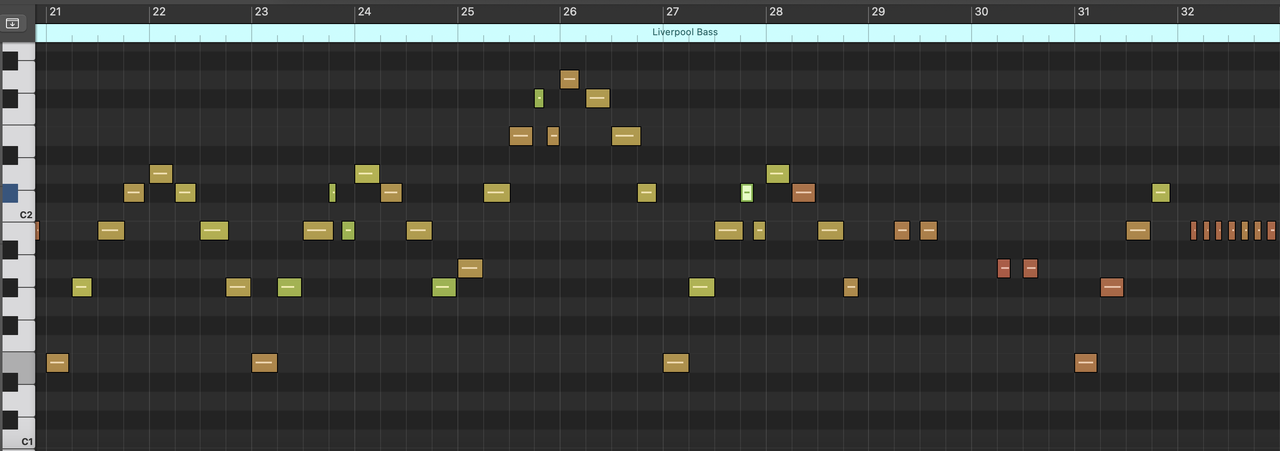
Logic Pro MIDI Piano Roll
Grid editor displaying musical note pitches on the vertical axis and rhythmic bars/beats on the horizontal axis.
🔍 Enlarge
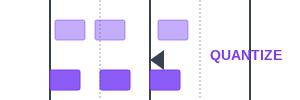
MIDI Quantization Grid
Snapping recorded note attack times and note endings to exact musical grid intervals (e.g. 1/8, 1/16, triplet).
🔍 Enlarge
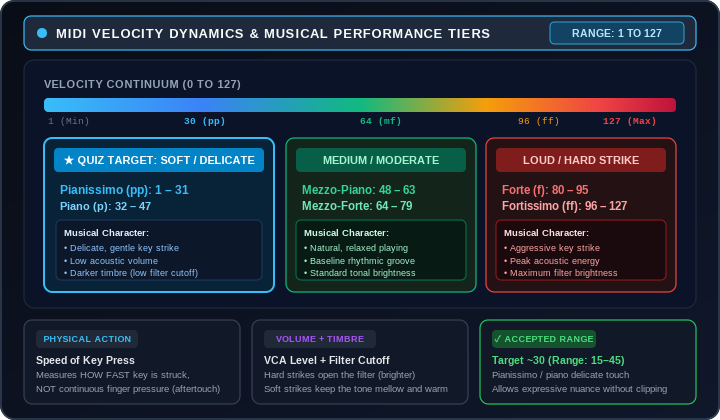
MIDI Note Velocity (0–127)
7-bit numerical value representing key strike velocity to trigger dynamic sample layers and filter brightness.
🔍 Enlarge
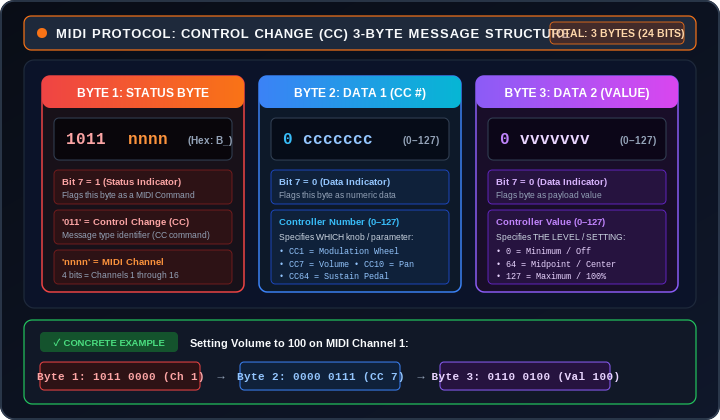
MIDI 3-Byte Protocol Structure
Status byte followed by two data bytes conveying note number, velocity, pitch bend, and continuous control.
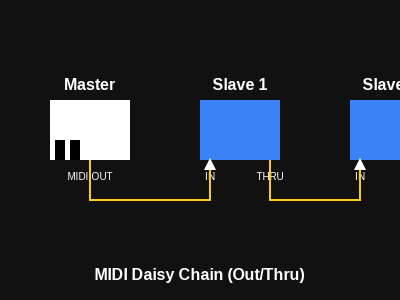
🔍 Enlarge
Standard MIDI 5-Pin DIN Loop
Serial communication daisy chain connecting MIDI In, MIDI Out, and MIDI Thru ports.
| Term | Examiner Definition & Technical Explanation | Study Guide |
|---|---|---|
|
Real-time input
Quantise |
When information is inputted by playing it in real-time on a MIDI controller. |
Sampling & MIDI Guide → |
|
Step-time input
Quantise |
Inputting notes with the mouse or step sequencer. Non-real-time entry. |
Sampling & MIDI Guide → |
|
¼, 1/8, 1/16
Quantise |
Notes ‘snapped’ to nearest 1/4, 1/8 or 1/16 of a bar depending how complex the rhythms are. |
Sampling & MIDI Guide → |
|
1/6, 1/12
Quantise |
Used when rounding to triplets or swing feel. 1/6 = 8th note triplets, 1/12 = 16th note triplets. |
Sampling & MIDI Guide → |
|
% quantise
Quantise |
Set how much to quantise notes on scale of 0 (no quantise) – 100% (full quantise). 50% = halfway to grid. |
Sampling & MIDI Guide → |
|
Groove templates
Quantise |
Quantisation grid when you take the groove/feel of any MIDI or audio region and apply it to new regions. |
Sampling & MIDI Guide → |
|
Humanise
Quantise |
Randomise the quantise so it’s not 100% and sounds more natural/human. Replicates some of the small timing errors humans make. |
Sampling & MIDI Guide → |
|
Note length quantise
Quantise |
You can quantise the beginning, length and end point of a MIDI note independently. |
Sampling & MIDI Guide → |
|
Velocity
Editing Skills |
How hard note is hit. In MIDI measured from 0-127. It is Data byte 2 for ‘note on’ message. Affects volume and timbre. |
Sampling & MIDI Guide → |
|
List editor
Editing Skills |
Lists all MIDI information in project in text format. Shows status bytes, data bytes, timestamps. |
Sampling & MIDI Guide → |
|
Piano Roll
Editing Skills |
Visual MIDI editor showing notes on piano keyboard. Easiest way to edit MIDI note data. |
Sampling & MIDI Guide → |
|
Velocity Editing
Editing Skills |
Adjusting the velocity values of MIDI notes. Can create dynamics, accents, or fix inconsistent playing. |
Sampling & MIDI Guide → |
|
MIDI Controller
How MIDI Works |
Piece of hardware for inputting MIDI information (keyboards, drum pads, wind controllers). |
Sampling & MIDI Guide → |
|
Sound Module
How MIDI Works |
Hardware containing presets with different sounds that can be triggered via MIDI. No keyboard attached – triggered externally. |
Sampling & MIDI Guide → |
|
Patch
How MIDI Works |
Another word for different MIDI instrument presets. Originally from patch cables in modular synths. |
Sampling & MIDI Guide → |
|
Protocol
How MIDI Works |
A set of rules. MIDI is a computer protocol/language for musical instruments to communicate. |
Sampling & MIDI Guide → |
|
8-Bit
How MIDI Works |
Enables 128 different values to be expressed in MIDI through 8-digit binary. Only 7 numbers available because first byte tells if message is status or data byte, other 7 allow 128 values (2^7). |
Sampling & MIDI Guide → |
|
Channel/Event message
How MIDI Works |
All messages sent to individual channels (1-16). Types: Note info (Note On/Off), Controller change (CC), Pitch bend. Communicated as ‘status byte’. |
Sampling & MIDI Guide → |
|
‘Notes’ Channel message
How MIDI Works |
Contains info on: 1) It’s a note message (Status), 2) Note pitch (Data byte 1), 3) Velocity (Data byte 2). Note length sent when ‘note off’ received. |
Sampling & MIDI Guide → |
|
Controller Channel message
How MIDI Works |
Contains: 1) It’s a controller message (status), 2) Which controller number (Data byte 1), 3) Value of controller (Data byte 2). |
Sampling & MIDI Guide → |
|
Continuous controller
How MIDI Works |
Controller that gradually changes over time from 0-127. Examples: Volume (CC7), Pan (CC10), Expression (CC11). |
Sampling & MIDI Guide → |
|
Switched controller
How MIDI Works |
Controller returning ‘off’ value for 0-64 and ‘on’ value for 65-127. Examples: Sustain pedal (CC64), Sostenuto (CC66). |
Sampling & MIDI Guide → |
|
System Messages
How MIDI Works |
Messages sent affecting whole project, not individual channels. Examples: time signature, tempo, MIDI clock. |
Sampling & MIDI Guide → |
|
General MIDI
How MIDI Works |
Standard invented in 1990s. Defines specific instrument sounds on each program number (1 = Acoustic Piano, 25 = Acoustic Guitar, etc.). |
Sampling & MIDI Guide → |
|
MIDI IN/OUT/THRU
How MIDI Works |
IN: Receives MIDI data from sequencer or other device. OUT: Sends data generated within device (keys, knobs, internal sequencer) plus anything from MIDI IN. THRU: Duplicates only what’s entering from MIDI IN, for daisy-chaining devices. |
Sampling & MIDI Guide → |
|
Jitter
How MIDI Works |
Inconsistency in timing between MIDI events. Causes timing to be unsteady, notes don’t align perfectly. |
Sampling & MIDI Guide → |
|
Latency
How MIDI Works |
Constant delay between note being played on controller and it sounding. Caused by slow computer (not enough RAM/CPU). |
Sampling & MIDI Guide → |
|
Format 0, 1 & 2
How MIDI Works |
The 3 formats MIDI files are saved in. Format 0 = single track. Format 1 = multiple tracks. Format 2 = multiple independent sequences. |
Sampling & MIDI Guide → |
|
Status byte
How MIDI Works |
The status of the message (Note On, Note Off, Controller, etc.). Always has 1 at beginning, leaving 7 spaces for 0-127 range: 1xxxxxxx |
Sampling & MIDI Guide → |
|
Databyte 1
How MIDI Works |
The ‘Num’ (number) channel in list editor. Always has 0 at beginning, leaving 7 spaces for 0-127 range: 0xxxxxxx. Indicates which note or controller. |
Sampling & MIDI Guide → |
|
Databyte 2
How MIDI Works |
The ‘Val’ (value) channel in list editor. Always starts with 0, leaving 7 spaces for 0-127 range: 0xxxxxxx. Indicates velocity or controller value. |
Sampling & MIDI Guide → |
|
MSB/LSB (in pitch bend)
How MIDI Works |
Most Significant Byte / Least Significant Byte. Combines values of Data byte 1 and 2 for 14-bit resolution: 0xxxxxxx + 0xxxxxxx = 128 x 128 = 16,384 different values. Gives smooth pitch bend without stepping between notes. |
Sampling & MIDI Guide → |
Audio Editing & Sample Splicing
Zero-crossing cuts, scrubbing, top-and-tail editing, destructive vs non-destructive trimming.
3 Terms
Key Diagrams & Hardware Guides
Examiner-verified signal flow, schematics, and equipment photos for this module.
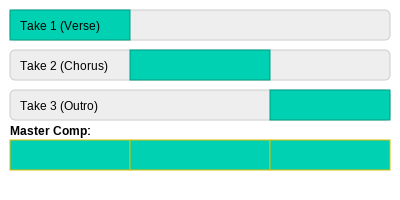
🔍 Enlarge
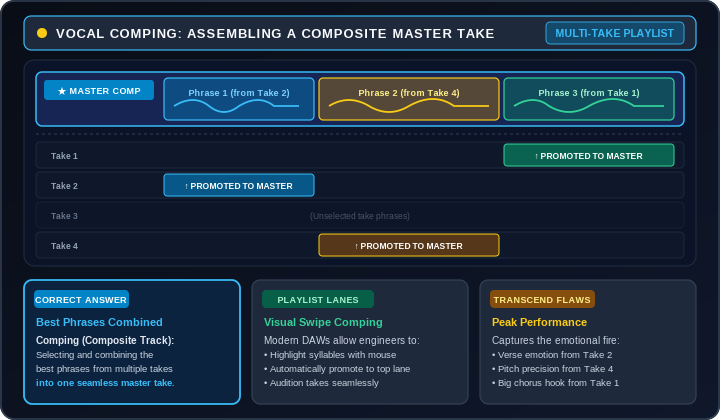
Vocal Comping & Take Lanes
Compositing multiple takes into a master performance using lane selection, crossfades, and edit points.
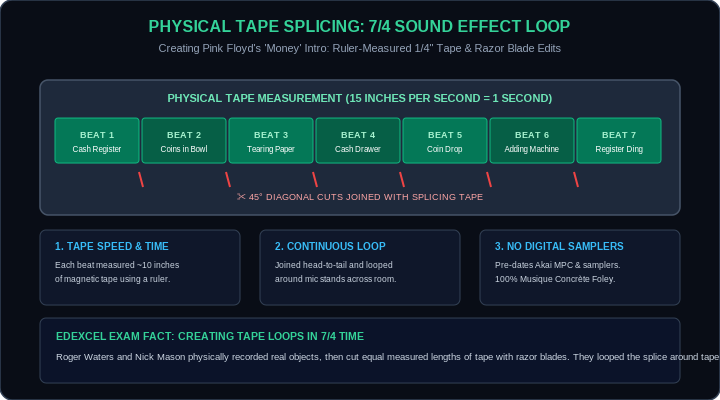
🔍 Enlarge
Analogue Tape Splicing & Editing
Historic physical razor blade editing on 1/4″ or 2″ magnetic tape using splicing blocks and adhesive leader tape.
| Term | Examiner Definition & Technical Explanation | Study Guide |
|---|---|---|
|
Scissor Tool/split/splicing
Truncating |
Chops up audio regions into separate pieces. Non-destructive in most DAWs. |
Sampling & MIDI Guide → |
|
Overlap/no overlap
Truncating |
Setting in Logic affecting audio editing behavior. Overlap: preserves beginning and end of region when dragged over another. No Overlap: Left (earlier) region always shortened as next region starts. |
Sampling & MIDI Guide → |
|
Removing clicks and noise
Truncating |
Use crossfading at edit points and cutting at zero-crossing points to avoid audible clicks. |
Sampling & MIDI Guide → |
Pitch Correction & Rhythm Editing
Autotune retune speeds, formant correction, Melodyne vocal flex, and audio quantising.
6 Terms
Key Diagrams & Hardware Guides
Examiner-verified signal flow, schematics, and equipment photos for this module.
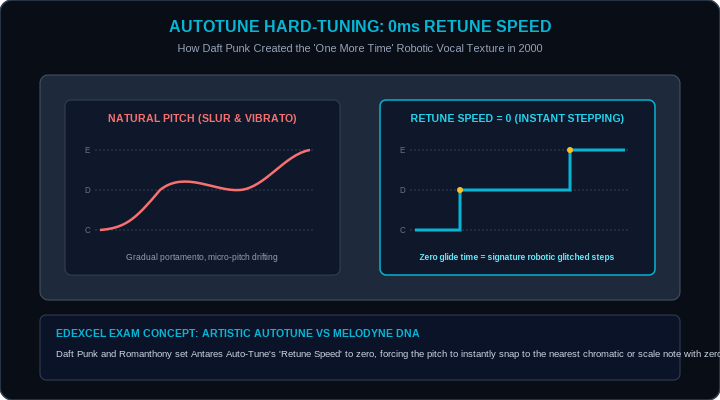
🔍 Enlarge
Autotune Retune Speed & Pitch Correction
Fast retune speeds (0ms) produce iconic robotic quantizing; slower retune speeds (20-50ms) retain natural vocal vibrato.
🔍 Enlarge
DAW Flex Pitch & Audio Quantising
Manipulating vocal pitch notes and rhythmic transients without altering tempo or introducing phase artifacts.
| Term | Examiner Definition & Technical Explanation | Study Guide |
|---|---|---|
|
Response time (ms)
Pitch Correction |
Time in milliseconds to snap pitch to nearest exact note. Fast response time (0-20ms) gives robotic Auto-Tune effect. Slow (100ms+) sounds natural. |
Sampling & MIDI Guide → |
|
Mix
Pitch Correction |
Percentage of transposed (corrected) pitches vs. untransposed (original) pitches. 100% mix needed to fully pitch-correct everything. |
Sampling & MIDI Guide → |
|
Formant shift
Pitch Correction |
Adjusts formants (vocal characteristics) without affecting pitch. Gives ‘Micky Mouse’ or ‘Darth Vader’ effect without pitch change. |
Sampling & MIDI Guide → |
|
Pitch shift (semitones)
Pitch Correction |
Transposes the music up or down by semitone increments. Changes pitch of entire performance. |
Sampling & MIDI Guide → |
|
Audio Quantise
How to Correct Inaccuracies in Rhythm |
Quantises transient peaks in audio so they align with click/grid. Corrects timing of audio recordings. |
Sampling & MIDI Guide → |
|
Flexi-time or elastic audio
How to Correct Inaccuracies in Rhythm |
Time-stretching algorithm that allows you to quantise or manipulate timing of audio flexibly. Cmd+F in Logic. |
Sampling & MIDI Guide → |
Dynamic Processing & Compressor Topologies
Threshold, ratio, knee, attack/release, sidechain ducking, noise gates, and Opto/FET/VCA hardware.
21 Terms
Key Diagrams & Hardware Guides
Examiner-verified signal flow, schematics, and equipment photos for this module.

🔍 Enlarge
Compressor Transfer Curve
Input vs Output transfer curve displaying Threshold point, Ratio slope, and Gain Reduction.
🔍 Enlarge
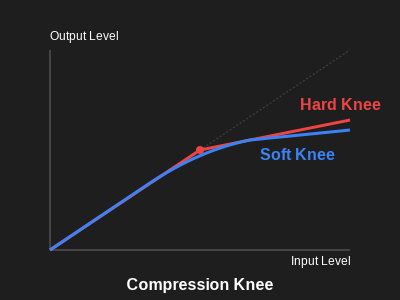
Hard Knee vs Soft Knee Compression
Soft knee gradually introduces compression ratio around threshold for smooth, transparent mastering control.
🔍 Enlarge
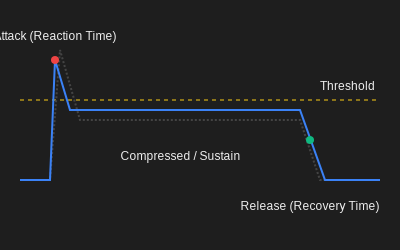
Attack & Release Dynamic Envelope
Attack controls how fast compression engages after threshold is exceeded; release controls speed of recovery.
🔍 Enlarge
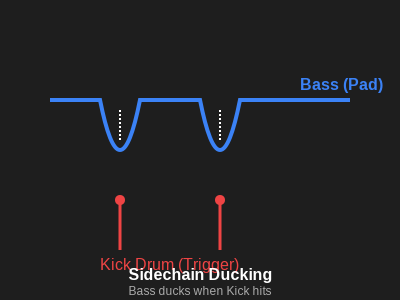
Sidechain Compression & Ducking
Directing an external signal (e.g. kick drum) to duck the gain of another track (e.g. bassline).
🔍 Enlarge
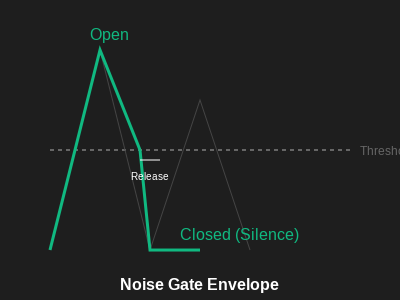
Noise Gate Envelope
Threshold, Attack, Hold, and Release parameters silencing unwanted bleed, spill, or hiss below threshold.
🔍 Enlarge
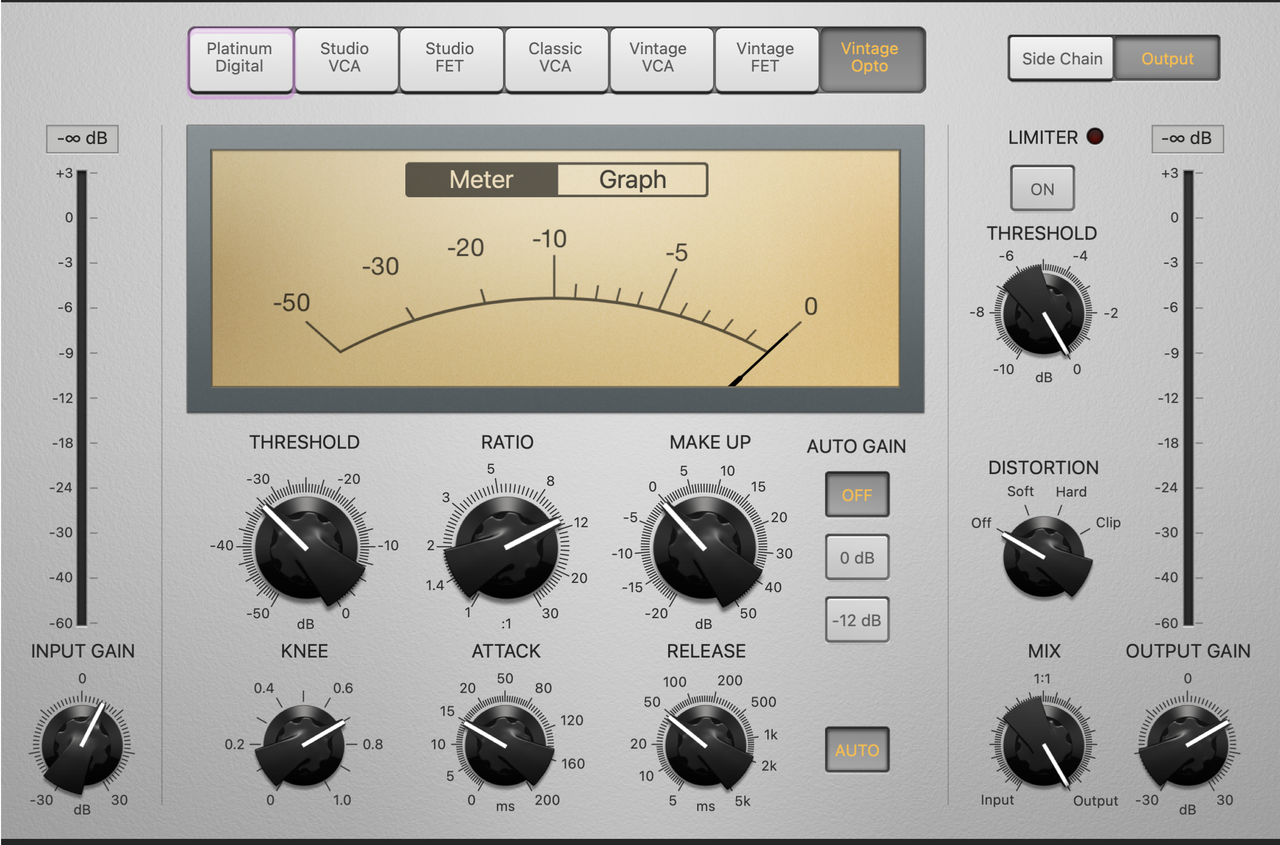
Teletronix LA-2A Optical Compressor
Uses an electroluminescent light panel and photo-resistor for smooth, warm, two-stage program-dependent release.
🔍 Enlarge
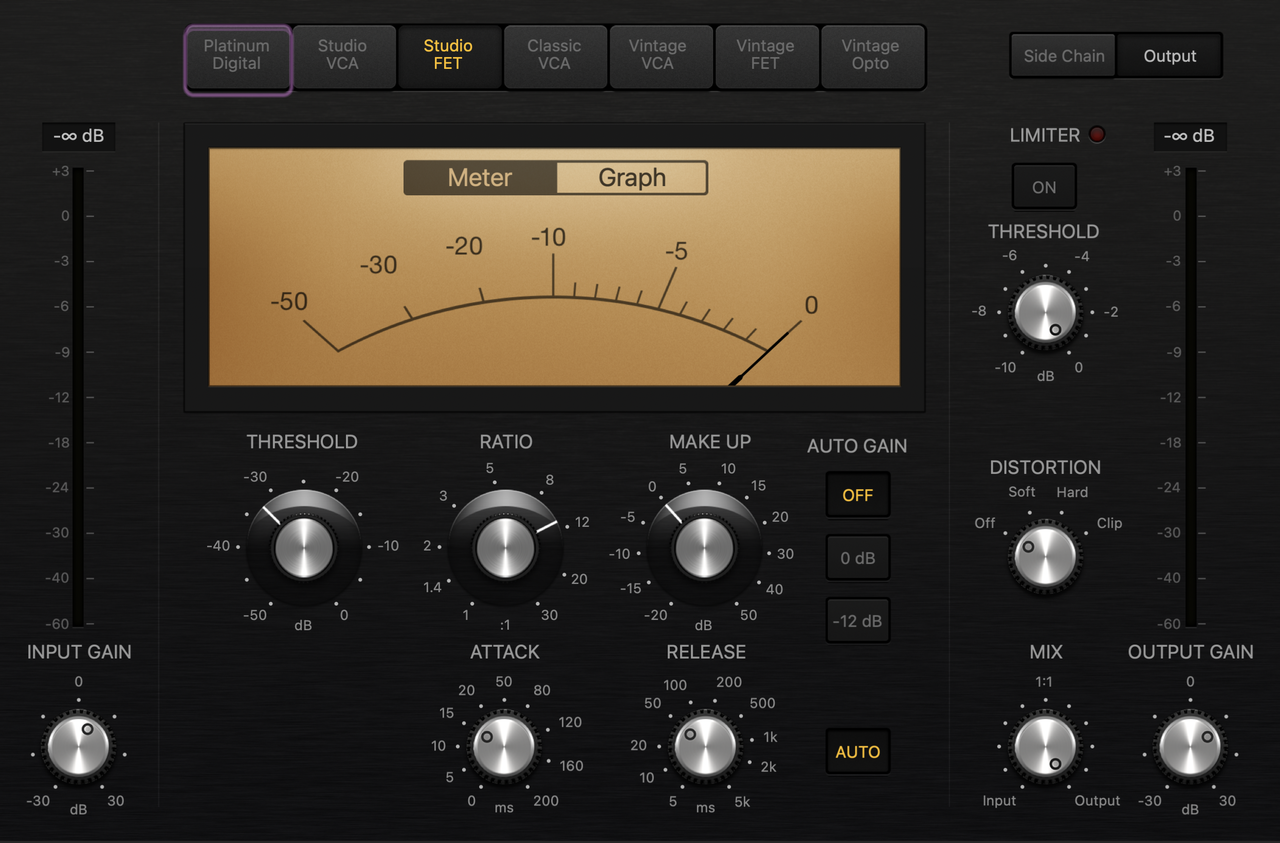
UREI 1176 FET Compressor
Ultra-fast field-effect transistor circuit capable of 20-microsecond attack times; famous for aggressive drum punch.
🔍 Enlarge
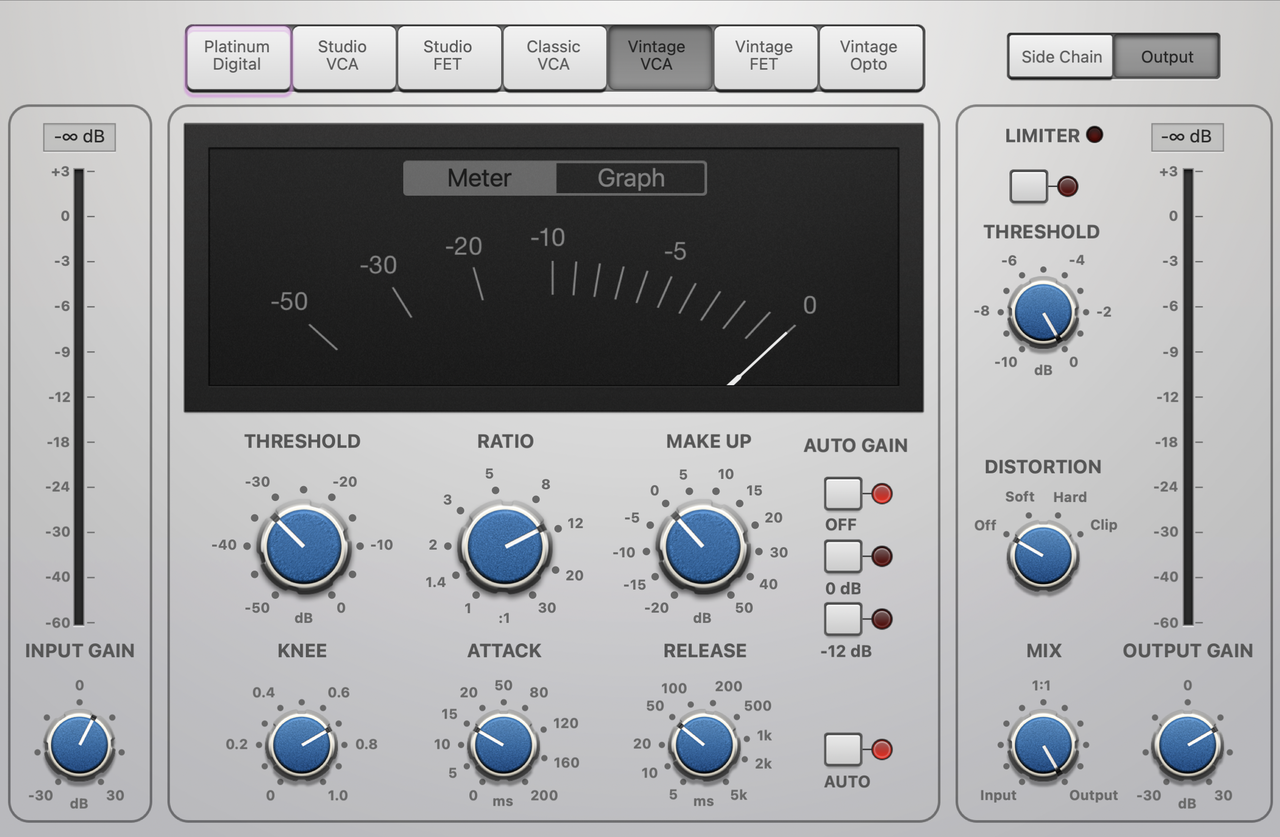
SSL G-Master Bus VCA Compressor
Voltage-Controlled Amplifier providing tight, punchy glue and transparent gain reduction across stereo mixes.
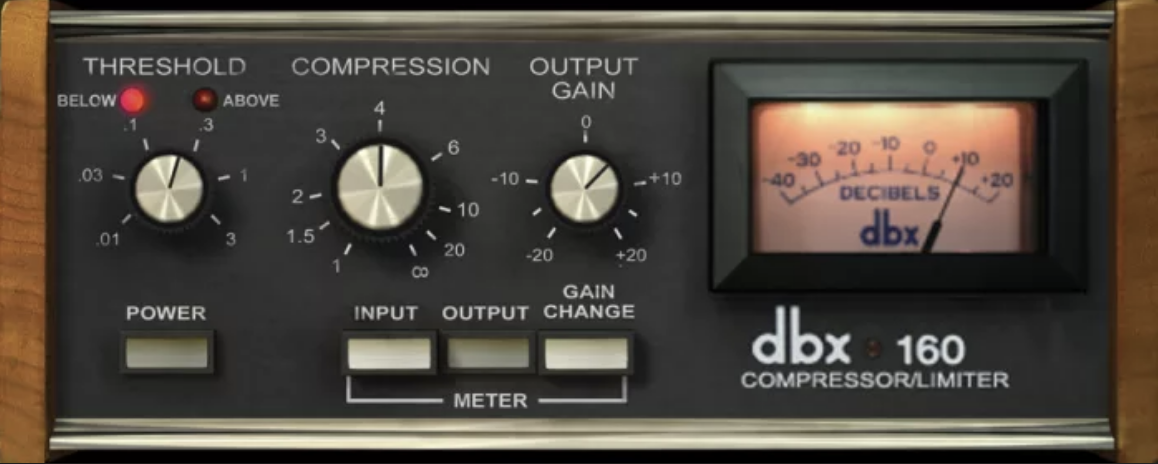
🔍 Enlarge
DBX 160 VCA Compressor
Legendary hard-knee VCA compressor renowned for snappy, punchy kick and snare drum dynamics.
| Term | Examiner Definition & Technical Explanation | Study Guide |
|---|---|---|
|
Limiter
Advanced Dynamic Processors |
A compressor with ratio of ∞:1 (infinity to one). Also known as brick wall compressor. Stops signal exceeding threshold completely. |
Dynamics Guide → |
|
Expander
Advanced Dynamic Processors |
Instead of decreasing dynamic range, it increases dynamic range. Opposite of compressor. Makes quiet sounds quieter and loud sounds louder. |
Dynamics Guide → |
|
De-esser
Advanced Dynamic Processors |
Removes sibilance by attenuating specific high frequencies (typically 5-8kHz) when they exceed threshold. Specialized compressor. |
Dynamics Guide → |
|
Pumping
Advanced Dynamic Processors |
Rhythmic ‘breathing’ effect created when sidechain compression is used. Kick drum triggering compression on bassline, for example. |
Dynamics Guide → |
|
Knee (hard/soft)
Compressor Parameters |
Compresses signal near threshold by different amounts. Soft knee: gradual compression onset. Hard knee: abrupt compression at threshold. |
Dynamics Guide → |
|
Threshold
Compressor Parameters |
The level (in dB) at which compressor starts working. Signals above threshold are compressed. |
Dynamics Guide → |
|
Attack (ms)
Compressor Parameters |
Time it takes for compressor to start working once signal has gone over threshold. Fast attack = transients reduced. Slow attack = transients preserved. |
Dynamics Guide → |
|
Release (ms)
Compressor Parameters |
Time it takes for compressor to stop working once signal has gone below threshold. Affects how compression recovers. |
Dynamics Guide → |
|
Ratio
Compressor Parameters |
Amount of compression. 4:1 = for every 4dB over threshold, output increases by 1dB. Higher ratio = more compression. |
Dynamics Guide → |
|
Circuit Type
Compressor Parameters |
Pre-sets in Logic emulating famous compressors (Urei 1176, Fairchild 670, SSL bus compressor, etc.). Different sonic characteristics. |
Dynamics Guide → |
|
Stereo Link
Compressor Parameters |
Links two compressors for left and right channels so they compress identically. Prevents stereo image shifting. |
Dynamics Guide → |
|
Multiband compression
Compressor Parameters |
Compresses different frequency bands independently. Bass, mids, and highs can be compressed by different amounts. |
Dynamics Guide → |
|
Side-chaining
Compressor Parameters |
Compressor triggered by external signal rather than signal being compressed. Classic example: kick drum triggering bass compression. |
Dynamics Guide → |
|
Threshold
Noise Gate Parameters |
Point at which sound is attenuated. Sounds must go over threshold for gate to open and pass signal. |
Dynamics Guide → |
|
Range/Reduction
Noise Gate Parameters |
Amount (in dB) the signal below threshold is attenuated by. -60dB = complete silence when gate closed. |
Dynamics Guide → |
|
Attack (ms)
Noise Gate Parameters |
Time taken for gate to open once signal passes threshold. Too fast can cause clicks. |
Dynamics Guide → |
|
Hold (ms)
Noise Gate Parameters |
Time gate is held open after signal has gone below threshold. Prevents chattering. |
Dynamics Guide → |
|
Release (ms)
Noise Gate Parameters |
Time it takes for gate to close once hold time is up. Too fast causes abrupt cuts. |
Dynamics Guide → |
|
Monitor
Noise Gate Parameters |
Solo mode to hear the signal that’s triggering the gate. Used to locate specific frequencies. |
Dynamics Guide → |
|
Side-chain
Noise Gate Parameters |
Gate triggered by external sound rather than signal being gated. Example: kick drum triggering gate on room mics. |
Dynamics Guide → |
|
Ducking
Noise Gate Parameters |
When one signal is attenuated due to presence of another. Example: DJ voice ducking music, or podcast voice ducking background music. |
Dynamics Guide → |
Equalisation (EQ) & Filter Topologies
Parametric EQ, Q bandwidth factor, shelving filters, high/low-pass slopes, and frequency spectrum bands.
21 Terms
Key Diagrams & Hardware Guides
Examiner-verified signal flow, schematics, and equipment photos for this module.
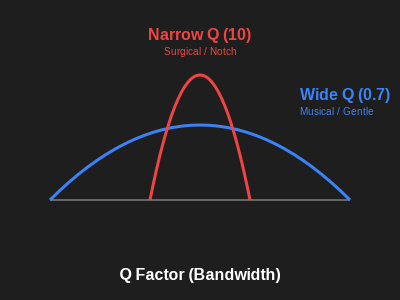
🔍 Enlarge
Parametric Bell Curve & Q Factor
Quality factor Q = Center Frequency / Bandwidth. High Q = narrow surgical notch; Low Q = wide musical tone shaping.
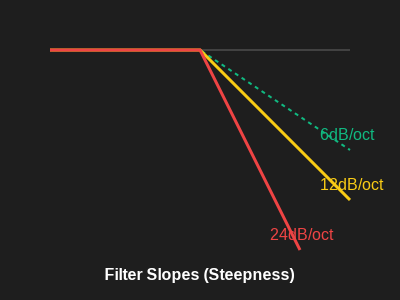
🔍 Enlarge
Filter Slopes (dB / Octave)
Steepness of attenuation roll-off: 6dB (1-pole), 12dB (2-pole), 18dB (3-pole), 24dB (4-pole).
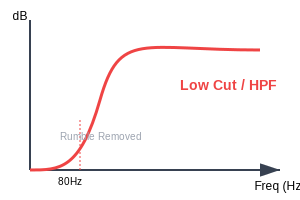
🔍 Enlarge
High-Pass Filter (Low Cut)
Attenuates sub-bass rumble, stage vibration, and mic handling noise while passing higher frequencies unhindered.
🔍 Enlarge
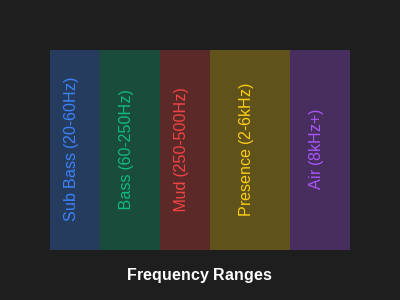
Audio Frequency Spectrum Bands
Sub (20-60Hz), Bass (60-250Hz), Low-Mid (250-500Hz), Mid (500-2kHz), High-Mid (2-6kHz), Highs/Air (6-20kHz).
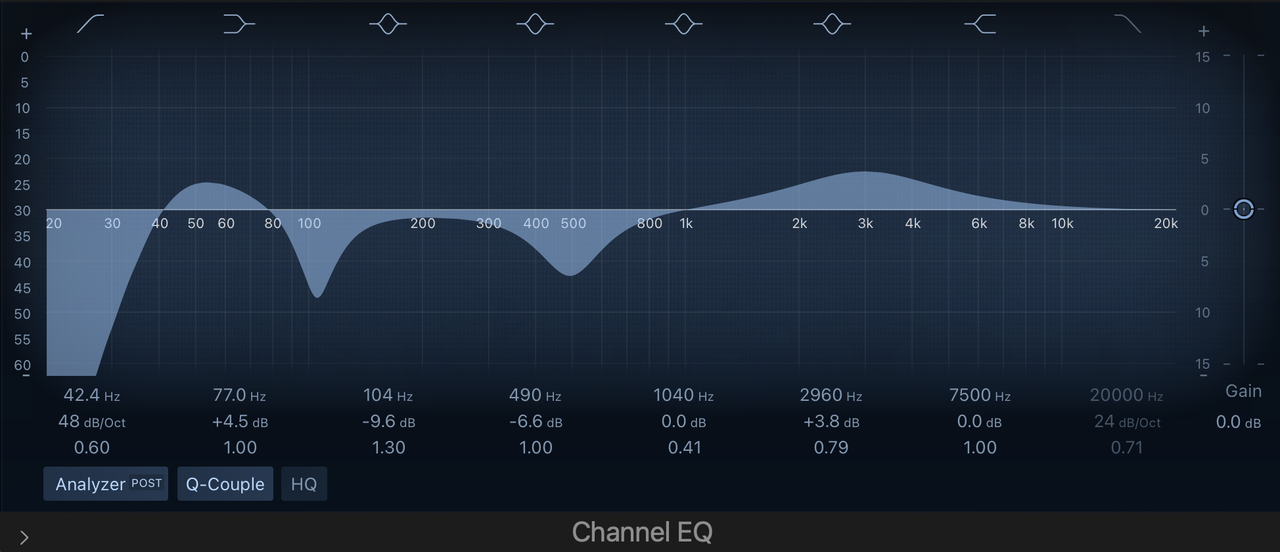
🔍 Enlarge
Logic Pro 8-Band Channel EQ
Full visual parametric equalizer with real-time FFT spectrum analyzer, shelving filters, and bell curves.
| Term | Examiner Definition & Technical Explanation | Study Guide |
|---|---|---|
|
Frequency Spectrum
Different Types |
20Hz – 20kHz. The limit of human hearing. Below 20Hz felt not heard, above 20kHz generally inaudible. |
EQ & Filters Guide → |
|
dB
Different Types |
Decibel. Measurement of loudness on logarithmic scale. +6dB = doubling of amplitude. |
EQ & Filters Guide → |
|
kHz/Hz
Different Types |
Hertz. Measurement of frequency. Cycles per second. 1 cycle = 1 complete wavelength. 1000Hz = 1kHz. |
EQ & Filters Guide → |
|
HPF
Different Types |
High-Pass Filter (also called Low-Cut). Removes low frequencies/rumble. Typically around 20-120Hz. Used for filter sweeps and cleaning up mix. |
EQ & Filters Guide → |
|
LPF
Different Types |
Low-Pass Filter (also called High-Cut). Removes high frequencies. Creates underwater effect. Reduces hiss/spill. Good for filter sweeps. Known as cutoff filter in simple synths. |
EQ & Filters Guide → |
|
Low shelf
Different Types |
Boosts or cuts all frequencies below a set point by a fixed amount. Gentle, musical EQ for broad tonal adjustments. |
EQ & Filters Guide → |
|
High Shelf
Different Types |
Boosts or cuts all frequencies above a set point by a fixed amount. Used for adding ‘air’ (10kHz+) or reducing harshness. |
EQ & Filters Guide → |
|
Band EQ (notch filter)
Different Types |
Boosts or cuts specific frequency range. Notch filter = very narrow, surgical cut to remove problem frequency (e.g. hum at 50/60Hz). |
EQ & Filters Guide → |
|
Filter Sweep
Different Types |
Moving filter cutoff frequency up and down (often with resonance). Creates dramatic sweeping sound effect. Classic in electronic music. |
EQ & Filters Guide → |
|
Graphic EQ
Different Types |
Fixed-band EQ with 25-31 sliders at preset frequencies (ISO standard). Visual and fast. Common in live sound and mastering. |
EQ & Filters Guide → |
|
Parametric EQ
Different Types |
Most flexible EQ type. Variable frequency, Q (bandwidth), and gain controls for each band. Standard in studio work. |
EQ & Filters Guide → |
|
Bypass
Different Types |
Turns effect off completely to compare processed vs unprocessed sound. Essential mixing technique for avoiding over-processing. |
EQ & Filters Guide → |
|
Frequency ‘Bands’
Different Types |
Sections of frequency spectrum. Low (20-250Hz) = bass. Low-Mid (250Hz-1kHz) = body. High-Mid (1-6kHz) = presence. High (6-20kHz) = air. |
EQ & Filters Guide → |
|
Rumble Filter
Different Types |
High-pass filter specifically designed for recording stage. Removes very low frequencies (below 40Hz) like air conditioning, traffic, handling noise. |
EQ & Filters Guide → |
|
Analyser
Different Types |
Visual display showing frequency content of audio in real-time. Helps identify problem frequencies or compare tracks for mastering. |
EQ & Filters Guide → |
|
Bandwidth/Q
Advanced EQ Parameters |
Width of frequency range affected by EQ. High Q = narrow, surgical (1-3). Low Q = wide, musical (0.3-1). |
EQ & Filters Guide → |
|
Resonance
Advanced EQ Parameters |
Self-oscillating peak at filter cutoff. Creates whistling tone. Used creatively in filter sweeps for emphasis and character. |
Synthesizer Guide → |
|
Centre Frequency
Advanced EQ Parameters |
Exact frequency being boosted or cut by parametric EQ band. The focal point of the EQ curve. |
EQ & Filters Guide → |
|
F stop/F turnover (slope)
Advanced EQ Parameters |
Steepness of filter rolloff measured in dB/octave. 6dB/oct = gentle, musical. 12dB/oct = moderate. 24dB/oct = steep, surgical. Higher slopes more phase shift. |
EQ & Filters Guide → |
|
Match EQ
Advanced EQ Parameters |
Analyses frequency content of reference track and applies similar EQ curve to your track. Useful starting point but use carefully. |
EQ & Filters Guide → |
|
‘Ringing out’
Advanced EQ Parameters |
Process of using EQ to remove feedback frequencies from PA system. Use narrow cuts at resonant frequencies causing feedback. |
EQ & Filters Guide → |
Time-Based & Modulation Effects
Reverb decay (RT60), pre-delay, early reflections, feedback delay, slapback, tape delay, chorus, and flanging.
52 Terms
Key Diagrams & Hardware Guides
Examiner-verified signal flow, schematics, and equipment photos for this module.

🔍 Enlarge
Acoustic Reverb Architecture
Direct sound arrives first, followed by discrete early reflections (giving room size cues), and diffuse late reverb tail.

🔍 Enlarge
Reverb Pre-Delay Timing
Time delay between dry source and the onset of reflections. Retains vocal clarity and front-of-mix presence.
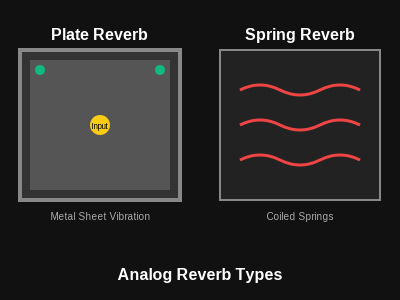
🔍 Enlarge
Plate & Spring Electromechanical Reverb
Mechanical reverbs vibrating suspended steel sheets (plate) or coiled springs (guitar amps).
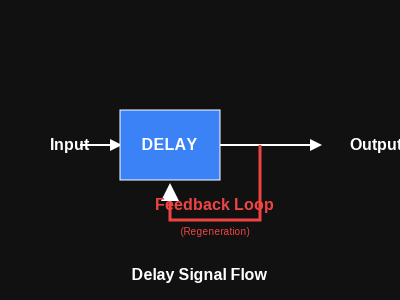
🔍 Enlarge
Delay Signal Feedback Loop
Percentage of delayed signal routed back into the input to create repeating rhythmic echoes.
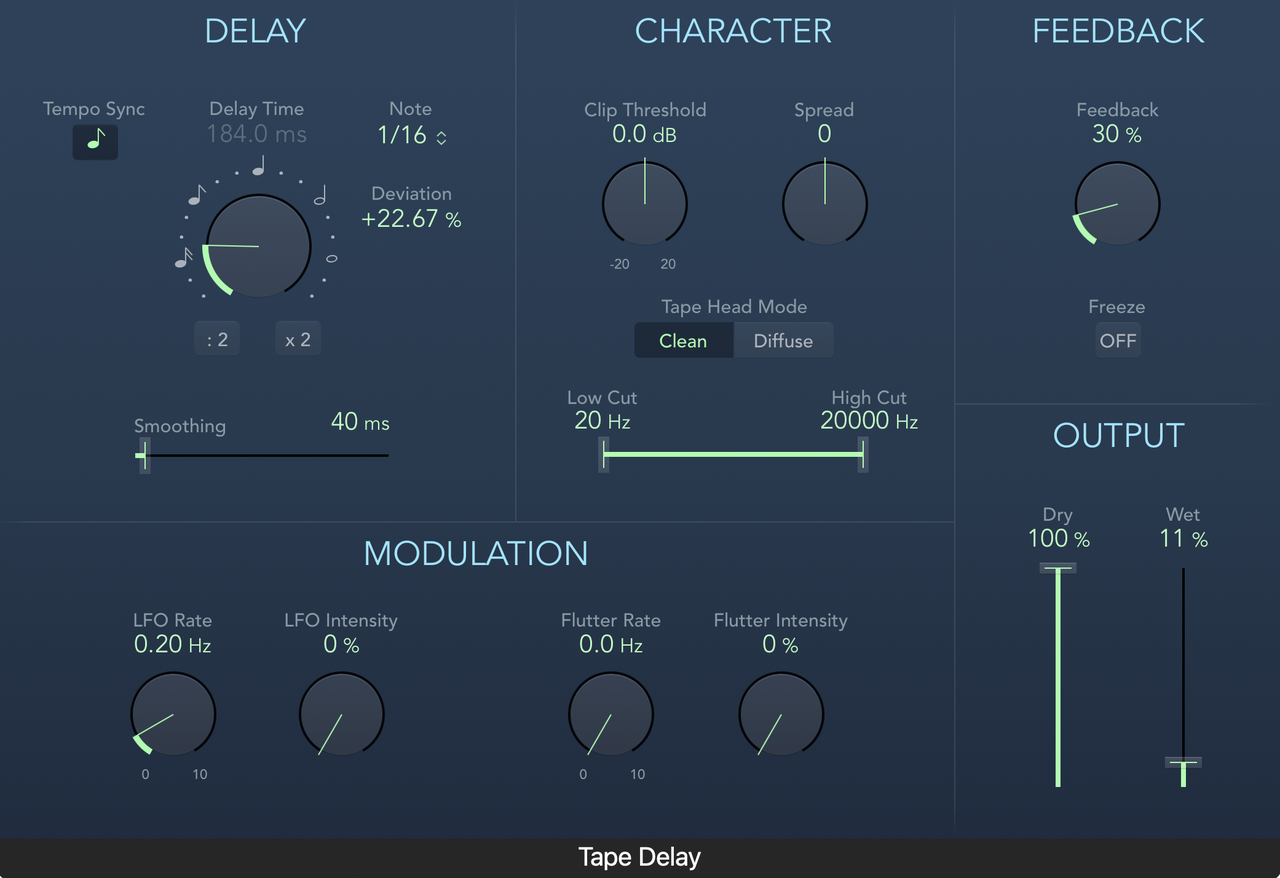
🔍 Enlarge
Vintage Tape Delay Echo Unit
Analogue magnetic tape loop with record, playback, and erase heads creating warm, saturated repeats with wow and flutter.

🔍 Enlarge
Flanger & Comb Filtering
Short delay (0.5–10ms) modulated by LFO mixed with dry signal creates deep sweeping peaks and notches like a jet plane.
| Term | Examiner Definition & Technical Explanation | Study Guide |
|---|---|---|
|
Wet/Dry
Core Parameters |
Balance between processed (wet) and unprocessed (dry) signal. 0% = completely dry, 100% = completely wet. |
Component 4 Guide → |
|
Mix
Core Parameters |
Same as wet/dry. Percentage difference between wet and dry signals. 50% = equal mix of both. |
Component 4 Guide → |
|
Bypass
Core Parameters |
Turns effect on/off to compare processed vs unprocessed. For A/B comparison without changing signal flow. |
Component 4 Guide → |
|
‘Additive’ effects
Core Parameters |
Effects that ADD to original signal without replacing it. Examples: reverb, delay. Usually sent via aux/return for efficiency. |
Component 4 Guide → |
|
‘In the mix’ effects
Core Parameters |
Effects that REPLACE or heavily modify original signal. Examples: phasing, flanging, chorus, EQ, compression. Usually inserted directly. |
Component 4 Guide → |
|
Reverb
Reverb |
Effect that simulates acoustic space by adding reflections and decay tail. After sound is made, it dissipates and reflects off surfaces. Creates sense of depth and space. |
Reverb Guide → |
|
Spring Reverb
Reverb |
Reverb time determined by tension of springs. Sound played through drive transducers, reverberates through springs, picked up by pickups. Often found in guitar amps (e.g. Fender). |
Reverb Guide → |
|
Plate reverb
Reverb |
Sound played through drive transducers into large metal plate (4×8 feet). Wet sound picked up by contact pickups. Reverb time controlled by dampening pads touching plate. Classic on vocals (Abbey Road Studios). |
Reverb Guide → |
|
Echo Chamber
Reverb |
Dry sound played through speaker in one corner of reflective room, wet sound recorded by mic at other end. Reverb altered by changing surfaces and moving speaker/mic. High-end reverb. |
Delay Guide → |
|
Digital reverb
Reverb |
Uses algorithms (computer rules) combining delay/echo/feedback/filtering to emulate real spaces. Most flexible and common today. |
Reverb Guide → |
|
Room Size
Reverb |
The bigger the room, the longer the pre-delay and reverb time. Small room = tight, intimate. Large room/hall = spacious, epic. |
Reverb Guide → |
|
Reverb time (seconds)
Reverb |
Time it takes for reverb to decay to silence (or -60dB). Short (0.5-1s) = small room. Medium (1-2s) = hall. Long (2-5s+) = cathedral. |
Reverb Guide → |
|
Density
Reverb Advanced Parameters |
How tightly packed the reverb reflections are. Higher density = smoother, more realistic reverb tail. Lower = grainier, more distinct reflections. |
Reverb Guide → |
|
High/low frequency control
Reverb Advanced Parameters |
EQ filtering applied to digital reverb reflections. Often cut lows to prevent muddiness and highs to reduce harshness. Shapes tone of reverb. |
Component 4 Guide → |
|
Convolution Reverb
Reverb Advanced Parameters |
Another term for sample-based reverb. Uses impulse responses (IR) – actual recordings of real spaces. Most realistic digital reverb available. Can capture any space. |
Reverb Guide → |
|
Impulse Response
Reverb Advanced Parameters |
Sampled reverb tail of sound in specific acoustic space (concert hall, bathroom, cave). Can be applied to any audio to emulate that exact space. |
Reverb Guide → |
|
Excitation signal
Reverb Advanced Parameters |
Test signal (usually white noise burst or sine sweep) used to record impulse response of space. Captures how space responds to all frequencies. |
Reverb Guide → |
|
Natural Reverb
Reverb Advanced Parameters |
Acoustic reverb captured naturally during recording by placing microphones further from source in acoustically good space. Most authentic but least controllable. |
Reverb Guide → |
|
Dampening Pad
Reverb Advanced Parameters |
Felt pads on plate reverb that physically touch the plate to control decay time. More contact = shorter reverb time, less sustain. |
Reverb Guide → |
|
Reverb time graph
Reverb Advanced Parameters |
Visual representation showing how reverb decays over time. Shows reflection density building up and gradual decay. |
Reverb Guide → |
|
RT60
Reverb Advanced Parameters |
Reverb Time 60. Official measurement: time in seconds for reverb to decay by 60dB. Standard for measuring reverberation in rooms. |
Reverb Guide → |
|
Pre-delay
Reverb Advanced Parameters |
Time delay between dry signal and first early reflections. Creates separation between source and reverb. Longer pre-delay = perception of larger space. Typical: 10-50ms. |
Reverb Guide → |
|
Early reflections
Reverb Advanced Parameters |
First reflections that reach listener after direct sound. Arrive within ~80ms. Create perception of room size and shape. Distinct from later reverb tail. |
Reverb Guide → |
|
Delay Time (ms) (repeat rate)
Delay |
Time between delay repeats in milliseconds. Short (1-50ms) = doubling/thickening. Medium (50-250ms) = distinct slap. Long (250ms+) = rhythmic echo. |
Delay Guide → |
|
Feedback (in %)
Delay |
The number of repeats/echoes. Low feedback (10-30%) = 1-3 repeats. High feedback (70%+) = many repeats fading out. 100%+ = infinite repeats building up. |
Delay Guide → |
|
Tempo Delay/timed delay/sync
Delay |
Rhythm of repeats synchronized to project tempo. Values like 1/4 note, 1/8 note, dotted 1/8, etc. Creates musical, in-time delays. |
Delay Guide → |
|
Low cut/high cut
Delay |
Filters applied to wet delayed signal only. High-pass to reduce muddiness, low-pass for darker, more vintage repeats. |
Component 4 Guide → |
|
Bass/Treble
Delay |
Simple EQ controls for delayed signal. Shape tone of repeats without affecting dry signal. |
Component 4 Guide → |
|
Mono Delay
Delay |
Only one wet signal output. Simple, focused delay. Takes less CPU and mixing space. |
Delay Guide → |
|
Stereo Delay
Delay |
Left and right delay channels can be treated independently. Different delay times, feedback, filtering per side. Creates wider image. |
Delay Guide → |
|
Pingpong Delay
Delay |
Panned delay where sound bounces between left and right speakers. Creates animated stereo movement. Classic in electronic music. |
Delay Guide → |
|
Multitap delay
Delay |
Create multiple delay taps with independent timing. Can create custom rhythms by setting multiple delay times manually. Very flexible. |
Delay Guide → |
|
ADT
Delay |
Automatic Double Tracking. Abbey Road technique: use delay (short, ~30-50ms) with slight pitch modulation to simulate double-tracked vocal/guitar without recording twice. |
Delay Guide → |
|
Slapback echo
Delay |
Very short delay (50-80ms) with very low feedback (only 1 repeat). Popularized by Sam Phillips at Sun Studios. Classic in rockabilly and rock ‘n’ roll vocals. |
Delay Guide → |
|
Copycat
Delay Advanced Parameters |
Famous Watkins Copicat tape delay unit. Uses continuous tape loop for organic, warm delays with slight pitch modulation and saturation. Vintage character. |
Delay Guide → |
|
Delay Designer
Delay Advanced Parameters |
Logic Pro’s advanced delay plugin. Allows independent control of each repeat’s pan position, EQ, and level. Extreme creative control. |
Delay Guide → |
|
Tape Loop
Delay Advanced Parameters |
Physical loop of magnetic tape used in vintage tape delays (e.g. Roland RE-201 Space Echo). Creates warm, saturated repeats with slight wow/flutter. |
Delay Guide → |
|
LFO (in delay)
Delay Advanced Parameters |
Adds modulation effect to delayed signal (vibrato/chorus effect on repeats). Creates pitch variation. Makes delay more interesting and vintage-sounding. |
Delay Guide → |
|
Freeze
Delay Advanced Parameters |
Captures current delay repeats and holds/sustains them indefinitely while freeze is engaged. Creates ambient pad textures from rhythmic delays. |
Delay Guide → |
|
Depth (Or intensity)
Basics of Modulated Delay |
A = amplitude of LFO modulation. How much the parameter (pitch, time, filter) is modulated. Higher depth = more extreme, noticeable effect. |
Component 4 Guide → |
|
Rate (Hz)
Basics of Modulated Delay |
Speed of LFO modulation in Hertz (cycles per second). Higher rate = faster modulation. Can also be synced to tempo (BPM). |
Component 4 Guide → |
|
¼ inch jack
Basics of Modulated Delay |
Unbalanced instrument cable used to connect guitar pedals. Mono (TS) cable with tip and sleeve. |
Component 4 Guide → |
|
9V battery
Basics of Modulated Delay |
Standard power source for many guitar effects pedals. Some pedals use power supply (Boss-style 9V DC adaptor). |
Component 4 Guide → |
|
Daisy Chaining
Basics of Modulated Delay |
Connecting multiple effect pedals in series using patch cables. Signal flows through chain: guitar → pedal 1 → pedal 2 → pedal 3 → amp. |
Component 4 Guide → |
|
Phase Cancellation
Basics of Modulated Delay |
When two identical or similar signals combine out of phase, certain frequencies are reduced or eliminated. Results in thin, hollow sound. |
Component 4 Guide → |
|
LFO Wave
Basics of Modulated Delay |
Shape of low frequency oscillator. Sine = smooth. Triangle = linear. Square = abrupt. Random = unpredictable. Affects character of modulation. |
Synthesizer Guide → |
|
Flanging
Flange |
Effect created by mixing two identical signals where one has very short delay (5-20ms) modulated by LFO. Creates sweeping, whooshing, jet-plane sound. Creates comb filter. |
Flanger Guide → |
|
Rate (Hz)
Flange |
Speed of LFO modulating the delay time. Slow (0.1-1Hz) = gentle sweep. Fast (5-10Hz) = aggressive, dizzy effect. |
Component 4 Guide → |
|
Depth (Or intensity) / Width
Flange |
How much the delay time is modulated. Greater depth = more dramatic sweep effect, more pronounced peaks and troughs in comb filter. |
Component 4 Guide → |
|
Feedback or Resonance (Res)
Flange |
Amount of effected signal fed back into input. Higher feedback = more intense, metallic, resonant flanging. Can self-oscillate at extreme settings. |
Synthesizer Guide → |
|
Manual
Flange |
Sets the center delay time of the flange without modulation. Like parking the flanger at specific position for static comb filtering. |
Component 4 Guide → |
|
Comb filter
Flange |
Frequency response graph that looks like teeth of a comb – series of peaks and notches at harmonic intervals. Created by combining delayed signals. Flanging creates moving comb filter. |
Flanger Guide → |
Stereo Imaging & Panning Law
Stereo width, binaural imaging, pan pot attenuation laws, and mono phase compatibility.
8 Terms
Key Diagrams & Hardware Guides
Examiner-verified signal flow, schematics, and equipment photos for this module.
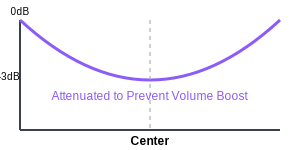
🔍 Enlarge
Stereo Pan Law Attenuation
Center-panned audio signals are automatically attenuated by 3dB to 4.5dB to prevent an artificial volume spike in stereo.
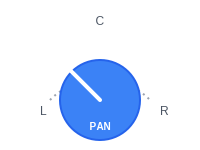
🔍 Enlarge
Pan Potentiometer (Differential Resistance)
Dual ganged potentiometer that decreases volume on one channel while increasing volume on the opposite channel.
| Term | Examiner Definition & Technical Explanation | Study Guide |
|---|---|---|
|
Stereo Set up
Stereo Setup |
Two-speaker system with left and right channels creating width and spatial positioning. Standard for music playback since 1960s. |
Stereo Guide → |
|
Surround Set Up
Stereo Setup |
Multiple speakers (5.1, 7.1, Atmos) placed around listener. Creates immersive 3D sound field. Used for cinema, gaming. |
Stereo Guide → |
|
Pan
Pan |
Short for panorama. Positions sound between left and right speakers. -100 (hard left) to +100 (hard right), 0 = center. |
Stereo Guide → |
|
Stereo Widening (Stereo spreader)
Pan |
Process of making stereo image wider using phase manipulation, mid-side processing, or subtle delays. Can cause mono compatibility issues. |
DAW & Mixers Guide → |
|
Mono-compatibility
Pan |
How well stereo mix translates to mono playback. Important for phones, clubs, radio. Check by summing to mono and listening for phase cancellation. |
Stereo Guide → |
|
Panning law
Panning Law |
Rule for level adjustment when panning. -3dB pan law = signal reduced 3dB at center to maintain constant power when summed. Different DAWs use different laws. |
Stereo Guide → |
|
mono-summing
Panning Law |
Combining left and right channels into single mono signal. Reveals phase cancellation issues that weren’t apparent in stereo. |
Stereo Guide → |
|
mid-side (M/S) processing (EQ)
Panning Law |
Based on M/S micing technique. Mid signal: contains everything distributed equally left and right (sum) = mono. Side signal: contains everything that differs between L/R (difference) = stereo width. Can EQ mid and side independently for stereo width control. |
Stereo Guide → |
Studio Acoustics & Sound Treatment
RT60 decay times, room modes, bass traps, diffusion, absorption coefficients, and flutter echoes.
6 Terms
Key Diagrams & Hardware Guides
Examiner-verified signal flow, schematics, and equipment photos for this module.
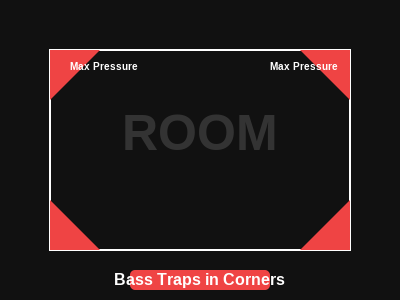
🔍 Enlarge
Corner Bass Trap Absorption
Low frequency modal pressure builds up in trihedral room corners; bass traps dampen low-end resonance.
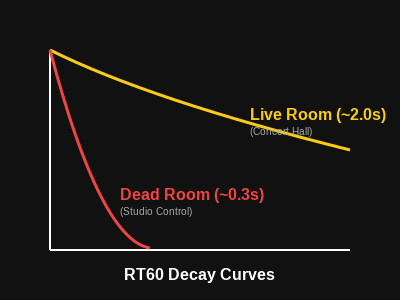
🔍 Enlarge
RT60 Decay Time Measurement
Graph comparing decay time across anechoic chambers (0.0s), control rooms (0.3s), concert halls (1.8s), and cathedrals (5s+).
🔍 Enlarge
Stereo Pan Law Attenuation
Center-panned audio signals are automatically attenuated by 3dB to 4.5dB to prevent an artificial volume spike in stereo.
| Term | Examiner Definition & Technical Explanation | Study Guide |
|---|---|---|
|
RT60 (Reverberation Time 60dB)
Acoustics |
The standard metric for acoustic decay: the time in seconds it takes for sound pressure level in an enclosed space to decrease by 60dB after the sound source has stopped. |
Reverb Guide → |
|
Standing Waves (Room Modes)
Acoustics |
Stationary sound waves formed when acoustic reflections between parallel walls reinforce or cancel specific frequencies, creating severe peaks and nulls in bass response. |
Acoustics Guide → |
|
Bass Trap
Acoustics |
Acoustic absorbers placed in room corners where low-frequency pressure builds up. Utilizes dense porous material or resonant diaphragms to tame muddy standing waves. |
Acoustics Guide → |
|
Acoustic Diffuser
Acoustics |
Surface with mathematical wells (QRD/Skyline) that scatters reflected sound evenly in all directions without removing acoustic energy, preserving room liveness while eliminating flutter echoes. |
Acoustics Guide → |
|
Flutter Echo
Acoustics |
Rapid, high-frequency ringing echo caused by sound bouncing repeatedly between parallel, hard, untreated reflective surfaces. |
Delay Guide → |
|
Direct Sound vs Reflected Sound
Acoustics |
Direct sound travels straight from source to listener/mic first. Reflected sound bounces off surfaces, arriving later with altered timbre and spatial reverberation. |
Acoustics Guide → |
Mastering, Headroom & Digital Metering
Peak vs RMS loudness, LUFS streaming targets, True Peak (dBTP), inter-sample clipping, and dithering.
8 Terms
Key Diagrams & Hardware Guides
Examiner-verified signal flow, schematics, and equipment photos for this module.

🔍 Enlarge
Inter-Sample Peak Clipping (True Peak)
Analog reconstruction filters can cause peaks between consecutive digital samples to exceed 0 dBFS, creating DAC distortion.
🔍 Enlarge
Digital Full Scale (0 dBFS) & Headroom
Peak metering illustrating the absolute ceiling of digital audio where exceeding 0 dBFS causes harsh square-wave clipping.
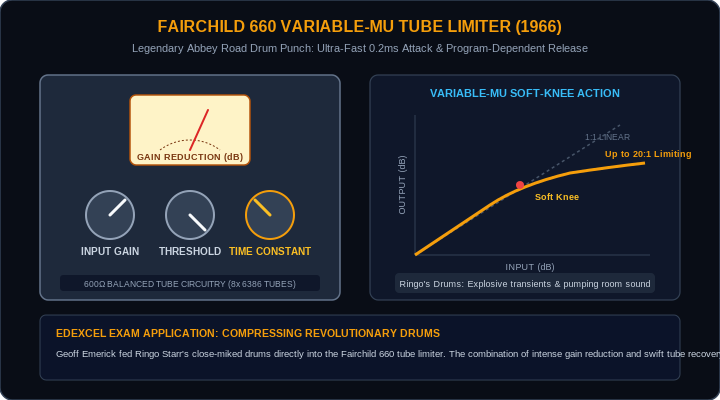
🔍 Enlarge
Fairchild 660 Tube Mastering Limiter
Legendary variable-mu vintage tube mastering limiter with 6 selectable time constants and smooth transformer saturation.
| Term | Examiner Definition & Technical Explanation | Study Guide |
|---|---|---|
|
Peak Level vs RMS Level
Mastering |
Peak level measures the instantaneous highest voltage spike in an audio waveform. RMS (Root Mean Square) measures the continuous average power/loudness perceived by the human ear. |
Mastering Guide → |
|
LUFS (LKFS)
Mastering |
Loudness Units relative to Full Scale. The international broadcast and streaming standard measuring integrated perceived loudness over time. (e.g. Spotify targets -14 LUFS, Apple Music -16 LUFS, YouTube -14 LUFS). |
Mastering Guide → |
|
True Peak (dBTP)
Mastering |
Metering that interpolates between digital samples to measure potential analog peaks generated during D/A reconstruction. Essential in mastering (typically set to -1.0 dBTP ceiling) to prevent inter-sample clipping on MP3/AAC encoding. |
Mastering Guide → |
|
Headroom
Mastering |
The safety margin in decibels between the highest audio peak signal and the maximum level a system can handle without digital clipping or analog distortion (0 dBFS in digital). |
Mastering Guide → |
|
Dithering
Mastering |
Low-level un-correlated random noise deliberately added when converting digital audio from a higher bit depth (e.g. 24-bit or 32-bit float) to a lower bit depth (e.g. 16-bit CD audio) to eliminate quantization distortion and truncation artifacts. |
Mastering Guide → |
|
Brickwall Limiter
Mastering |
A peak limiter with an infinite compression ratio (∞:1) and ultra-fast attack time used as the final stage of mastering to prevent any signal peak from exceeding a defined ceiling. |
Mastering Guide → |
|
Inter-Sample Clipping
Mastering |
Distortion that occurs when the analog reconstruction filter between two consecutive high-level digital samples peaks above 0 dBFS, causing audible distortion on consumer playback converters. |
Sampling & MIDI Guide → |
|
Dynamic Range (LRA)
Mastering |
The ratio in decibels between the quietest background noise floor and the loudest undistorted peak of an audio recording. Loudness Range (LRA) measures variation across a track. |
Mastering Guide → |
Master These Definitions in the MTG App
Over 3,000+ interactive multiple-choice questions, signal-path diagnostics, and component tests mapped directly to the Pearson Edexcel specification.
